
WP Residence Help WP Residence Help

  • WPRESIDENCE
  • Video Tutorials
  • Client Support
  • API
Home / FAQ / How to remove Favorites option

How to remove Favorites option

5496 views 1

In order to remove Favorite, you need to follow the below steps:

Step1: Delete Favorite page so the Favorites no longer appear in User Dashboard:
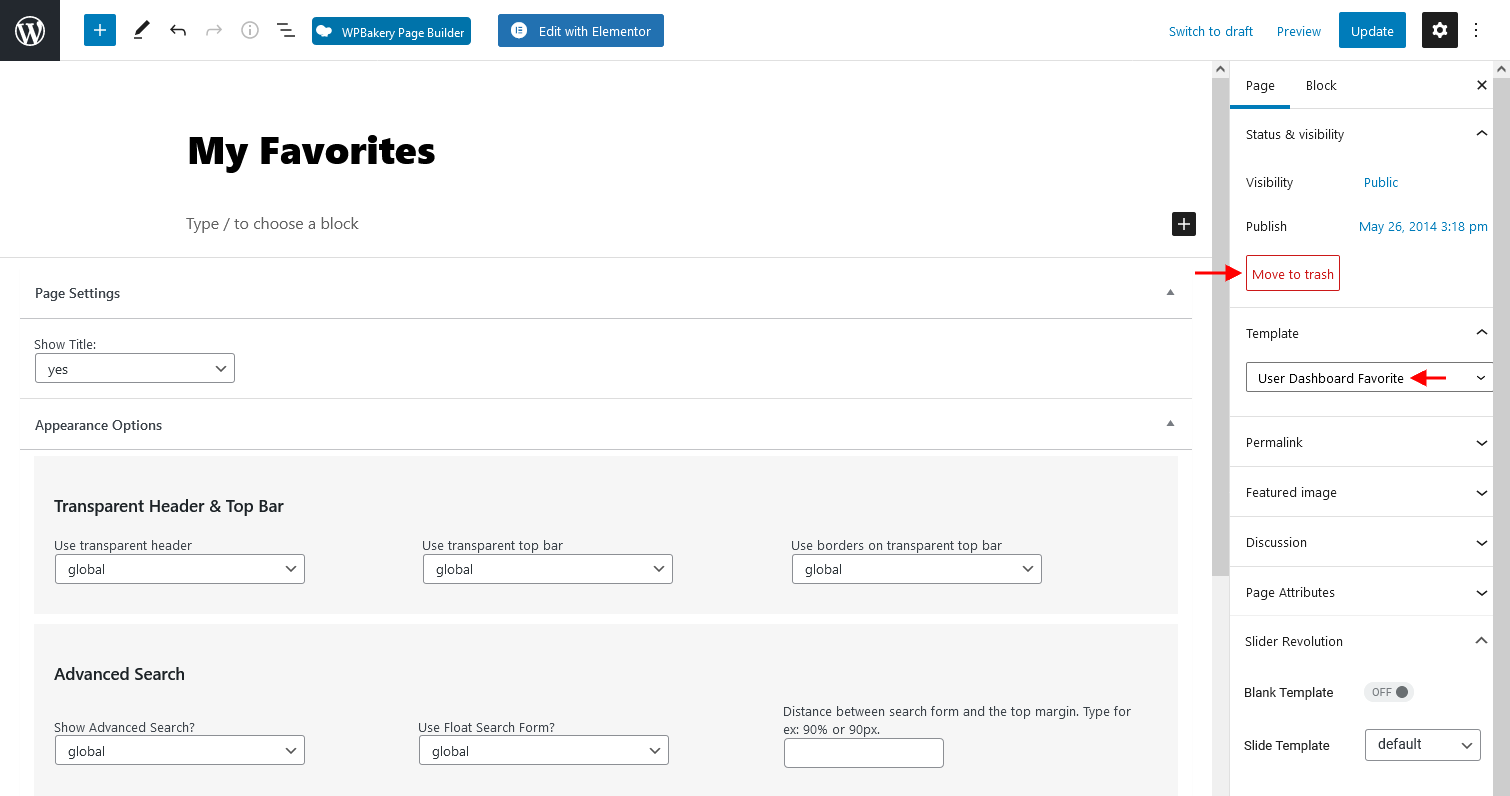
Step2: Remove Heart icon from property Unit.

Use the below custom CSS:

.icon-fav-off,
.icon-fav-on {
display: none;
}

Step3:  Remove the add to favorites from Property Page

Use the below custom CSS:

#add_favorites {
display: none;
}

Help article about how to add custom CSS

FAQ

Related Articles

  • FAQ – HTTP / Mixed Content Errors in Console for Font Loading
  • FAQ: Can I create private off-market listings?
  • Why does the homepage map show fewer properties than expected?
  • FAQ – How can I remove the gray or gradient background between images on Property Card Type 5?

Help Categories

  • 18Agent, Agency & Developers
  • 5Blog Posts & Blog Lists
  • 39Elementor Shortcodes Built-In
  • 54FAQ
  • 15Footer
  • 5Getting Started
  • 37Header
  • 2IDX & MLSImport
  • 6Installation & Setup
  • 24Installation FAQ
  • 23Maps & Location Settings
  • 21Multi-Language - Third Party Plugins
  • 6Other Third party Plugins
  • 21Pages
  • 4Payments & Monetization
  • 20Property Lists, Categories & Archive
  • 37Property Pages & Layouts
  • 32Search & Filtering
  • 162Technical how to | Custom Code Required
  • 8Technical: Actions and filters
  • 7Technical: Child Theme
  • 86Theme Options & Global Settings
  • 7Translations & Languages
  • 16WPBakery Shortcodes
  • 50WPEstate / WPResidence Translate Plugin
  • 51WPResidence / WPEstate CRM
  • 50WPResidence 5.0 Documentation
  • 9WPResidence Elementor Studio

Join Us On

Powered by WP Estate - All Rights Reserved
  • WPRESIDENCE
  • Video Tutorials
  • Client Support
  • API