
IDX plugins and WPResidence
IDX plugins are optional. They are not required to install or use WPResidence.
WPResidence can be used with third-party IDX plugins, but compatibility means the plugin can run with the theme without creating theme errors or conflicts. It does not mean that IDX listings become WPResidence properties automatically.
Most IDX plugins use their own listing system, shortcodes, pages, widgets, or external data display. Those listings are managed by the IDX plugin and not by WPResidence.
iHomefinder Optima Express compatibility
WPResidence includes compatibility support for the iHomefinder Optima Express plugin.
This means you can use iHomefinder Optima Express with WPResidence without the theme returning errors just because the plugin is active.
However, listings added or displayed through iHomefinder are managed by the iHomefinder plugin. They do not use WPResidence property options, property pages, property cards, search fields, maps, or taxonomies.
Enable iHomefinder support in WPResidence
WPResidence has the option Use Optima Express plugin.
You can find it in:
Theme Options > MLS – IDX – RESO
You must install the iHomefinder Optima Express IDX plugin separately.
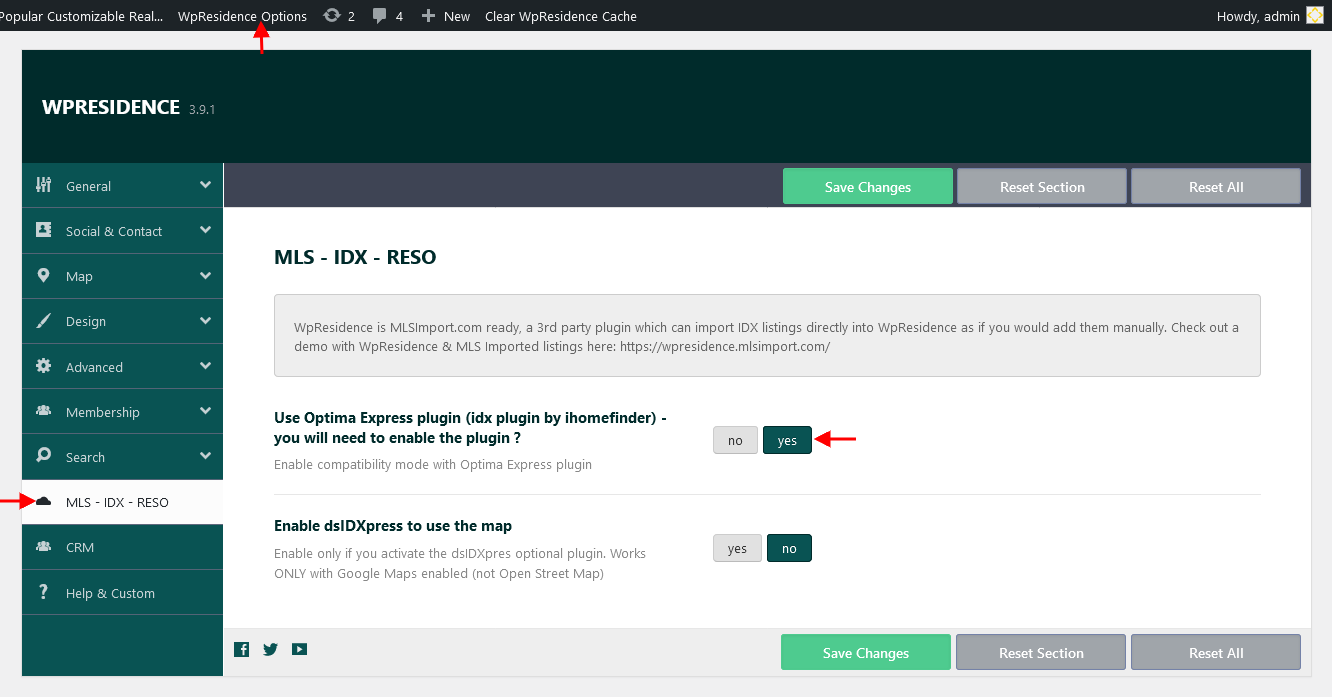
If you do not use iHomefinder Optima Express, keep this option disabled. If you enable iHomefinder support without the iHomefinder plugin being active, conflicts can appear, especially with dropdowns and tabs.
Important IDX plugin limitations
The listings added through the IDX plugin are managed only with the plugin features and plugin options.
IDX plugin listings usually do not become native WPResidence properties.
This means they will not automatically use:
- WPResidence property pages
- WPResidence property cards
- WPResidence Advanced Search
- WPResidence Half Map
- WPResidence taxonomies
- WPResidence property widgets
- WPResidence Studio property templates
If the IDX plugin gives you a shortcode or widget, you can usually add that shortcode or widget inside a WPResidence page, but the listing display and functionality will still be controlled by the IDX plugin.
MLSImport and full WPResidence integration
For a seamless MLS integration with WPResidence, MLS listings must be imported into the WPResidence property structure.
This is available with MLSImport.
MLSImport connects to an approved MLS RESO Web API feed and imports MLS listings as native WPResidence property posts. This allows imported listings to use WPResidence features such as:
- WPResidence property pages
- WPResidence property cards
- WPResidence search forms
- WPResidence maps and map pins
- WPResidence taxonomies
- WPResidence Elementor widgets
- WPResidence Studio property templates
With MLSImport, you can map MLS fields to WPResidence fields, custom fields, and taxonomies. This gives you control over how MLS data is saved and displayed on the website.
MLSImport also keeps listings synchronized with the MLS feed, based on the import task configuration.
More information:
https://mlsimport.com/
MLSImport video:
https://www.youtube.com/watch?v=ocaBl0zs-FU
Use third-party IDX plugins if you want to display IDX results with that plugin’s own design and features. Use MLSImport if you want MLS listings to be fully integrated with WPResidence.