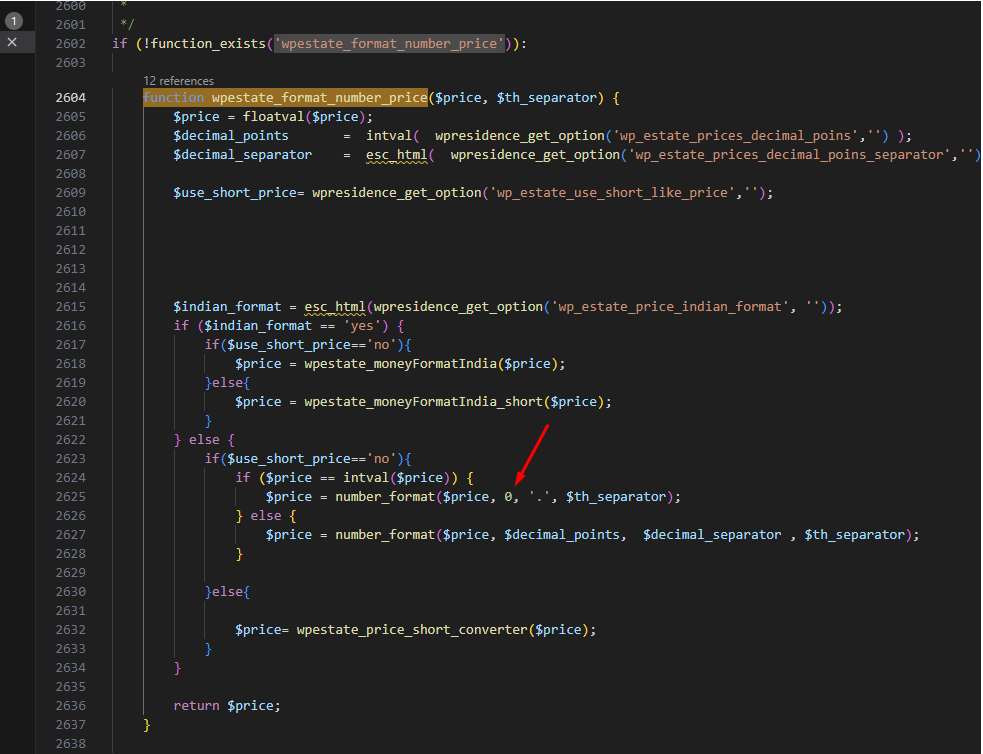
The development team recommends a quick change if you want to always display a decimal portion in prices—even when the value ends with .00.
1. Open wpresidence/libs/help_functions.php in the parent theme (tested with WPResidence theme version **5.3.2.1**).
2. Locate the wpestate_format_number_price function. In version 5.3.2.1 it appears around line **1179** —search for number_format( $price, 0 ) inside the helper if the line number drifts in later releases.
3. Update the call to number_format() so that the **decimals** argument is 2 instead of 0. This forces prices to show two decimal places.
If you are using a child theme (recommended), copy the wpestate_format_number_price function into the child theme first:
1. The function is wrapped in if ( ! function_exists( ‘wpestate_format_number_price’ ) ), which makes it child-theme ready.
2. Copy the entire function into the child theme’s functions.php (or an included file).
3. Modify the copied version there so the decimals argument is set to 2. Making the edit inside the child theme ensures the change persists after parent theme updates.