
WP Residence Help WP Residence Help

  • WPRESIDENCE
  • Video Tutorials
  • Client Support
  • API
Home / Technical how to | Custom Code Required / How to force google autocomplete to return results in one language

How to force google autocomplete to return results in one language

4594 views 0

By default the API detects the browser settings of the user and set the language appropriately.

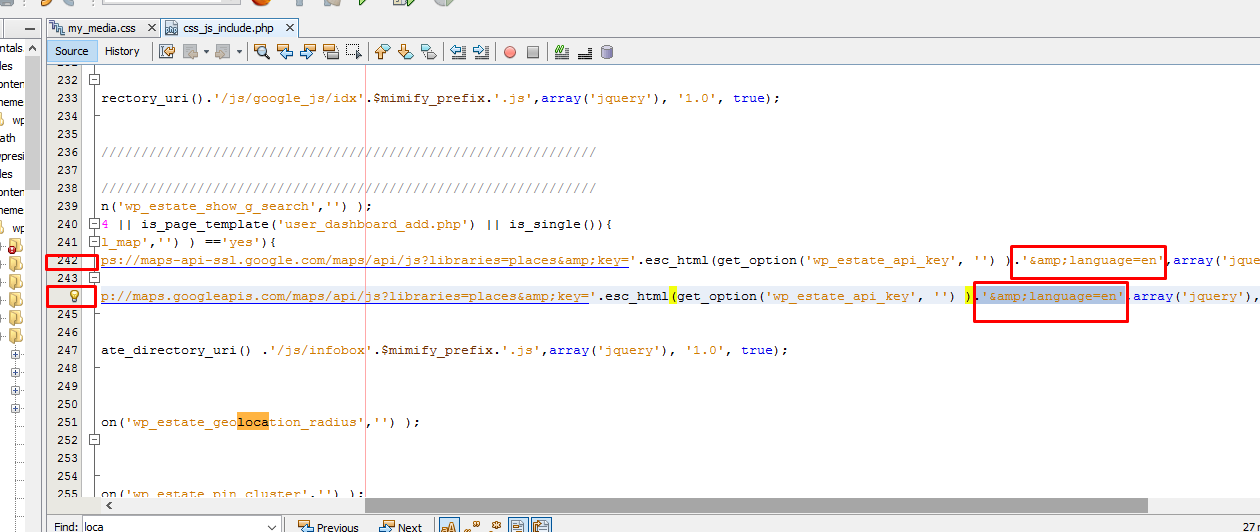
To force google autocomplete to return results in one language must add language for autocomplete.

Add highlighted code in css_js_include.php as displayed in  below screenshot:
Technical how to | Custom Code Required

Related Articles

  • Technical: Change the Schedule Tour Email Text and the Form Default Message
  • Property list filter customization
  • Technical – How to Change the Minimum Image Dimensions for Property Uploads in WPResidence
  • Introduction to WPResidence Header Customization

Help Categories

  • 18Agent, Agency & Developers
  • 5Blog Posts & Blog Lists
  • 38Elementor Shortcodes Built-In
  • 45FAQ
  • 15Footer
  • 5Getting Started
  • 37Header
  • 2IDX & MLSImport
  • 6Installation & Setup
  • 23Installation FAQ
  • 23Maps & Location Settings
  • 21Multi-Language - Third Party Plugins
  • 6Other Third party Plugins
  • 20Pages
  • 4Payments & Monetization
  • 20Property Lists, Categories & Archive
  • 37Property Pages & Layouts
  • 31Search & Filtering
  • 162Technical how to | Custom Code Required
  • 8Technical: Actions and filters
  • 6Technical: Child Theme
  • 86Theme Options & Global Settings
  • 7Translations & Languages
  • 16WPBakery Shortcodes
  • 50WPEstate / WPResidence Translate Plugin
  • 51WPResidence / WPEstate CRM
  • 50WPResidence 5.0 Documentation
  • 8WPResidence Elementor Studio

Join Us On

Powered by WP Estate - All Rights Reserved
  • WPRESIDENCE
  • Video Tutorials
  • Client Support
  • API