
WP Residence Help WP Residence Help

  • WPRESIDENCE
  • Video Tutorials
  • Client Support
  • API
Home / Footer, Technical how to | Custom Code Required, Technical: Child Theme / Child Theme: How to add links to copyright message

Child Theme: How to add links to copyright message

6275 views 0

If you wish to add a link in the footer copyright text, this has to be done by adding custom HTML in the PHP file for the footer.

Install the WpResidence Child Theme – https://help.wpresidence.net/article/how-to-install-child-theme/

Edit templates\footer_template.php file locally

The code would look like this and it would be added in templates\footer_template.php
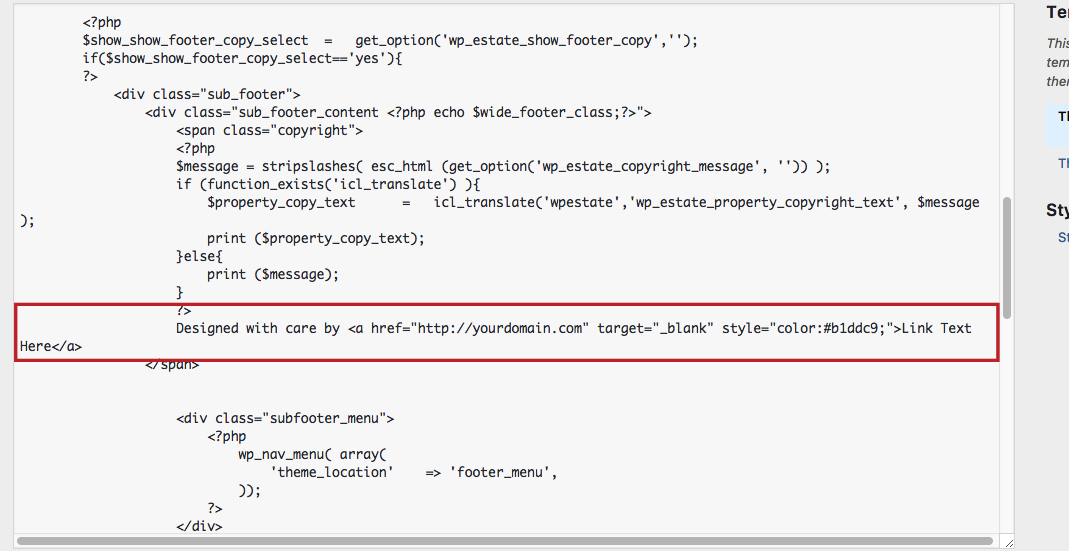
Upload the modified file in wpresidence-child/templates\footer_template.php after you create the folder templates as in the main theme

FooterTechnical how to | Custom Code RequiredTechnical: Child Theme

Related Articles

  • Technical: Change the Schedule Tour Email Text and the Form Default Message
  • Property list filter customization
  • Technical – How to Change the Minimum Image Dimensions for Property Uploads in WPResidence
  • Technical – How to Grant Access to Custom Post Type Capabilities for a Specific Role after 5.1.1 Theme Update

Help Categories

  • 18Agent, Agency & Developers
  • 5Blog Posts & Blog Lists
  • 38Elementor Shortcodes Built-In
  • 55FAQ
  • 15Footer
  • 5Getting Started
  • 37Header
  • 2IDX & MLSImport
  • 6Installation & Setup
  • 22Installation FAQ
  • 23Maps & Location Settings
  • 21Multi-Language Third Party Plugins
  • 6Other Third party Plugins
  • 19Pages
  • 4Payments & Monetization
  • 20Property Lists, Categories & Archive
  • 36Property Pages & Layouts
  • 31Search & Filtering
  • 163Technical how to | Custom Code Required
  • 8Technical: Actions and filters
  • 6Technical: Child Theme
  • 86Theme Options & Global Settings
  • 6Translations & Languages
  • 16WPBakery Shortcodes
  • 51WPResidence / WPEstate CRM
  • 50WPResidence 5.0 Documentation
  • 8WPResidence Elementor Studio
  • 50WPResidence Translate Plugin

Join Us On

Powered by WP Estate - All Rights Reserved
  • WPRESIDENCE
  • Video Tutorials
  • Client Support
  • API