
WPResidence allows you to control what registered users can access from their dashboard, whether visitors can save favorite properties without login, and whether users can register or submit properties from the front end.
These options are useful when you want visitors to use only buyer-style features, such as Favorites and Saved Searches, without allowing them to submit properties.
Leave Favorites and Saved Searches available for users
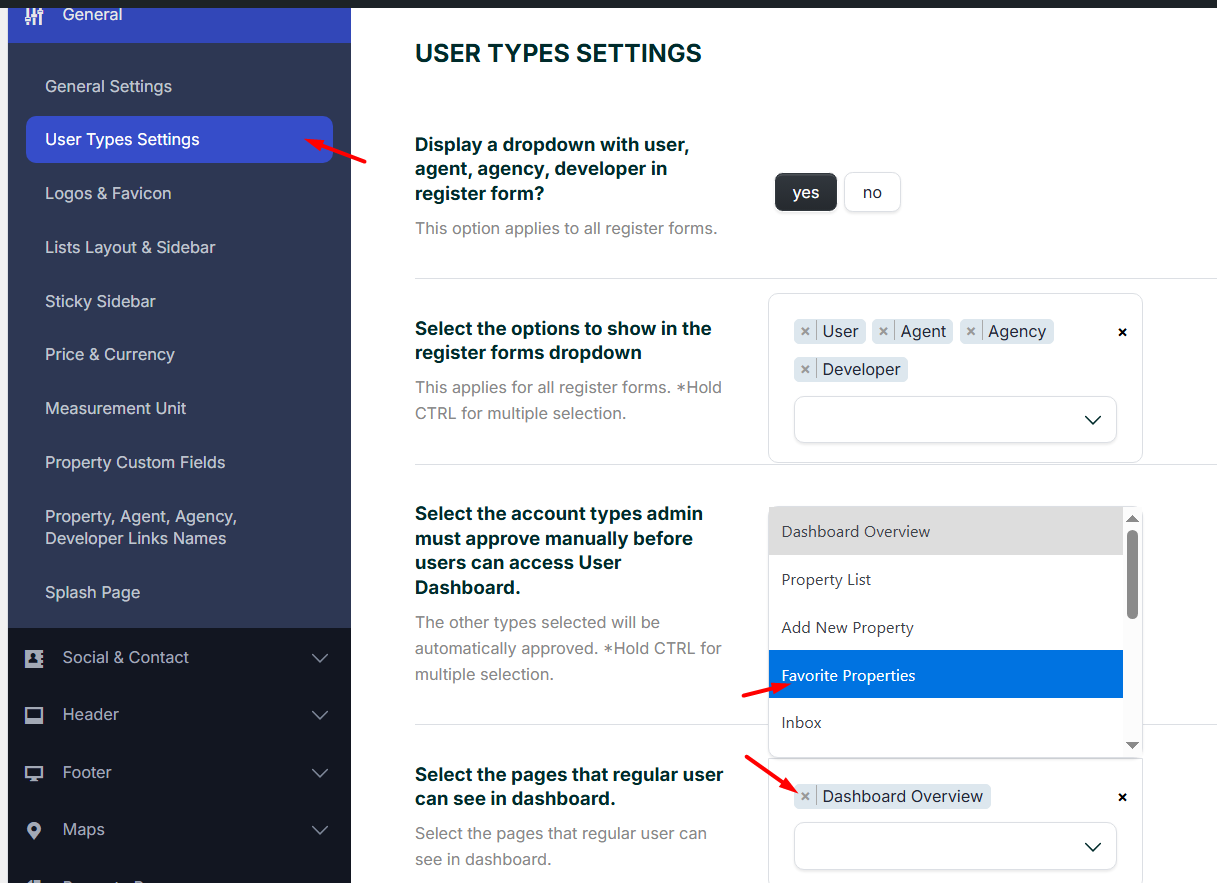
You can control which dashboard pages are visible for each user type from:
Theme Options > General > User Type Settings
This option works regardless of whether the User Type dropdown is enabled in the registration form.
From this section, you can decide which dashboard pages are shown for each user type, such as:
- Favorites
- Saved Searches
- Add Listing
- My Properties
- Other available dashboard pages
For example, if you want regular users to register only to save favorite properties and saved searches, you can leave only Favorites and Saved Searches enabled for that user type.
Related help:
Add Agents, Agencies, Developers, and Users in WPResidence
Regular users and what they can do
WPResidence supports multiple user types:
- Regular users
- Agents
- Agencies
- Developers
Regular users are usually used for lead capture. They can register to save favorite properties, save searches, send messages, or access limited dashboard features.
Regular users are not always meant to submit properties. If your website is managed only by the administrator, agents, agencies, or developers, you can keep the user dashboard limited to buyer-style features.
You can control which user types are allowed to register from:
Theme Options > General > User Role Settings
Then you can control which dashboard pages each user type can see from:
Theme Options > General > User Type Settings
Disable the Add Listing button from the header
To remove the Add Listing button from the default theme header, go to:
Theme Options > Header > Login / Register & Submit
Set:
Show submit property button in header? – No
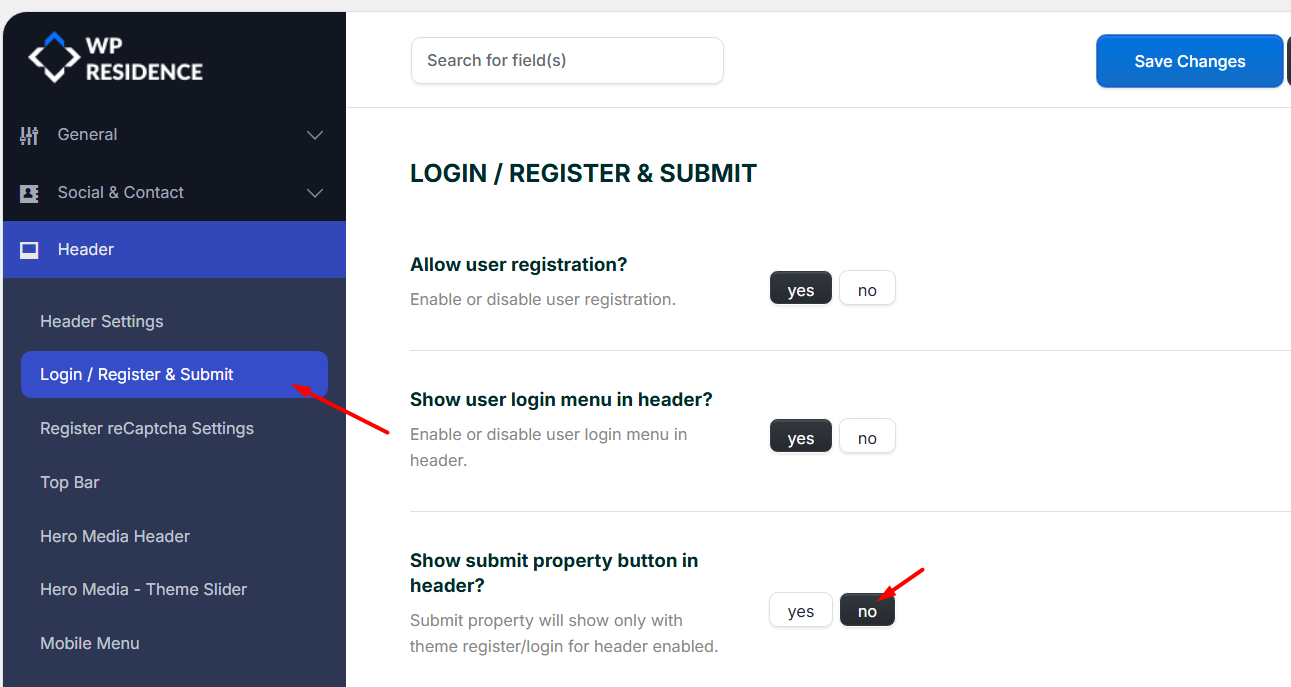
This removes the submit property button from the default header area.
If you also want to remove the Add Listing option from the user dashboard, go to:
Theme Options > General > User Type Settings
Then remove the Add Listing dashboard page from the user types that should not submit properties.
Allow saving favorites without login
WPResidence can allow visitors to save favorite properties without creating an account. In this case, favorites are saved using browser storage.
This is useful when you want visitors to save properties quickly, without forcing them to register or log in first.
If you want users to save favorites only after login, make sure the option that requires login for favorites is enabled from the header/login settings.
Related help:
Save Favorites
Disable user registration
To fully disable front-end user registration, follow both steps below.
Step 1: Disable WordPress registration
Go to:
WP Admin > Settings > General
Uncheck:
Anyone can register
Step 2: Disable registration from the theme options
Go to:
Theme Options > Header > Login / Register & Submit
Set:
Allow user registration? – No
After this, the login modal can still be available, but the registration option will be disabled.
Related help:
Disable Login & Register / Do not allow users to register on the site
Optional: Disable login icon and submit button
From the same header options area, you can also disable:
- The user login icon
- The Submit Property / Add Listing button
Use these options if you do not want visitors to access login, registration, or front-end submission from the header.
Important notes
- User Type Settings control which dashboard pages each user type can see.
- User Role Settings control which user types can register from the front end.
- The Add Listing button in the default header is managed from Theme Options > Header > Login / Register & Submit.
- If you use a custom Elementor or Studio header, remove the Add Listing button directly from that custom header template.
- If no dashboard pages are selected in User Type Settings, all dashboard pages will be visible.
- To disable registration completely, disable it from both WordPress settings and Theme Options.
- Saving favorites without login uses browser storage, not a permanent user account.
Related help articles
- Theme Options – General – User Role Settings
- Add Agents, Agencies, Developers, and Users in WPResidence
- User Dashboard Pages
- Save Favorites
- How to remove Favorites option
- Login & Register
- Theme Options – Default Header Settings
- Disable Login & Register / Do not allow users to register on the site
- How to Manage the Header: Default Header vs Custom Elementor Header