
WP Residence Help WP Residence Help

  • WPRESIDENCE
  • Video Tutorials
  • Client Support
  • API
Home / Blog Posts & Blog Lists, Theme Options & Global Settings / How to Control Similar Blog Posts

How to Control Similar Blog Posts

6 views 0

The Similar Blog Posts settings control the related blog posts shown on single blog post pages.

These settings help visitors discover more articles from your website based on shared blog taxonomies, such as tags or categories.

Important: Similar Blog Posts are for blog posts only. They are different from Similar Listings, which are used on property pages.

Content

  • Where to find Similar Blog Posts settings
  • Number of similar blog posts
  • Similar blog posts per row
  • Select taxonomies for similar blog posts
  • Select Similar Blog Posts order by
  • Select Similar Blog Posts order
  • Similar Blog Posts in custom blog post templates
  • Important notes
  • Related help articles

Where to find Similar Blog Posts settings

Go to:

Theme Options > Blog > Similar Blog Posts

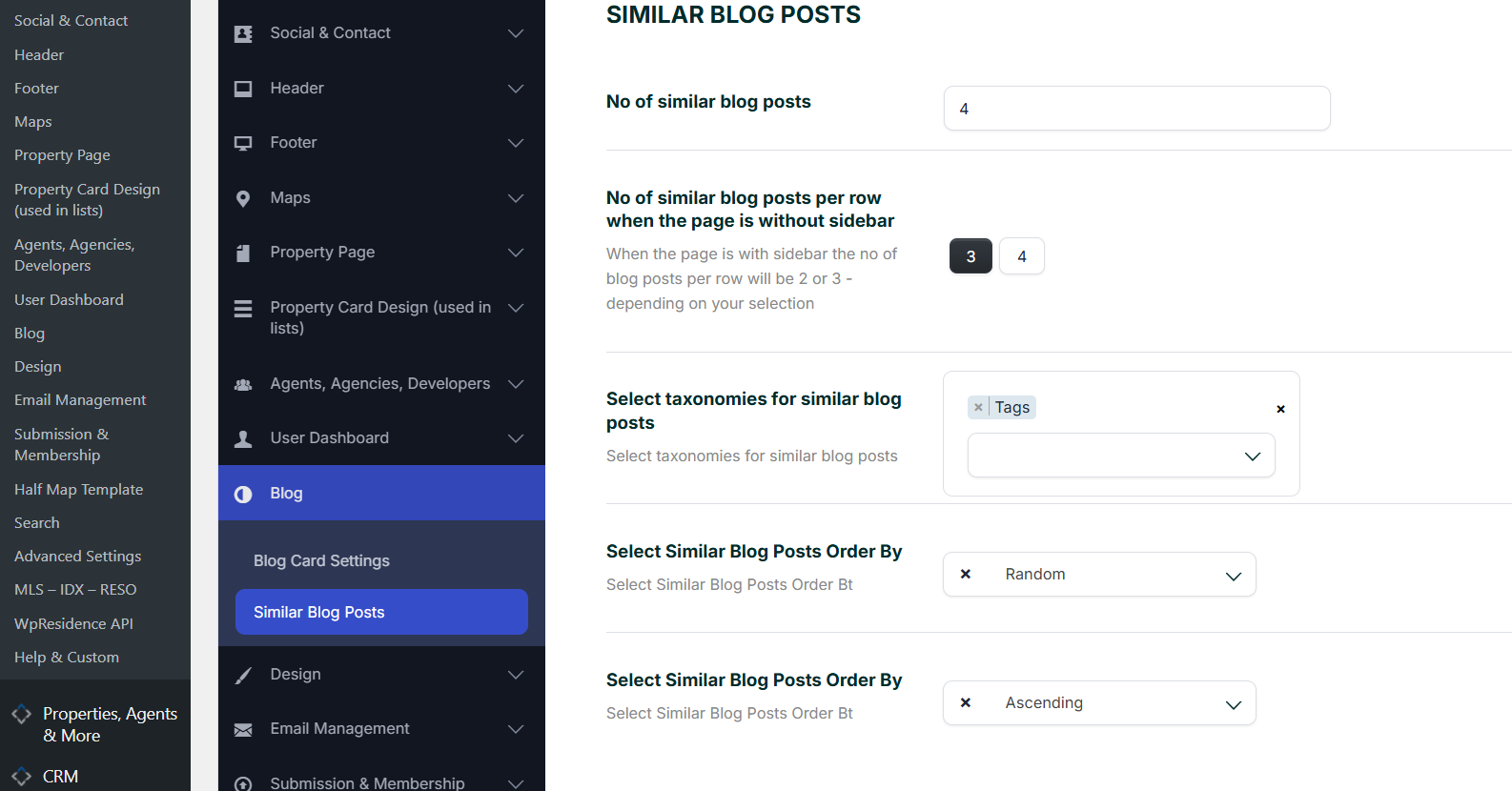
From this section, you can control how many similar blog posts show, how they are selected, and how they are ordered.
Number of similar blog posts

The option No of similar blog posts controls how many related blog posts are displayed.

Example:

4

This means the theme will show up to 4 similar blog posts, if matching posts exist.

Similar blog posts per row

The option No of similar blog posts per row when the page is without sidebar controls how many posts show in one row when the blog post page does not use a sidebar.

You can choose:

  • 3 posts per row
  • 4 posts per row
Note: When the blog post page has a sidebar, the number of posts per row can be reduced to fit the available page width.

Select taxonomies for similar blog posts

The option Select taxonomies for similar blog posts controls how the theme decides which blog posts are similar.

For example, you can select Tags so the theme shows other blog posts that share the same tag as the current blog post.

Depending on your setup, you can use blog taxonomies such as:

  • Tags
  • Categories
Important: Similar Blog Posts can show only if other published blog posts match the selected taxonomy rule. For example, if you select Tags, the current post and other posts must share at least one tag.

Select Similar Blog Posts order by

The option Select Similar Blog Posts Order By controls how similar blog posts are sorted.

For example, you can set the order by:

  • Random
  • Date
  • Title
  • Other available order options from the dropdown

If you select Random, the related posts can appear in a different order when the page is loaded again.

Select Similar Blog Posts order

The second order option controls the direction of the order.

You can choose:

  • Ascending
  • Descending

For example, if you order by date, descending usually shows newer posts first.

Similar Blog Posts in custom blog post templates

If you use the default WPResidence blog post layout, the Similar Blog Posts section is managed by the theme.

If you use a custom single blog post template created with WpResidence Studio Templates and Elementor, make sure the related posts widget or section is added inside that custom template.

Important: Theme Options control the Similar Blog Posts settings, but a custom Elementor blog post template must include the related posts element where you want the similar posts to appear.

Important notes

  • Similar Blog Posts are used on single blog post pages.
  • They are separate from Similar Listings used on property pages.
  • The posts shown depend on the selected taxonomy, such as Tags or Categories.
  • If no matching posts exist, the Similar Blog Posts section may not show results.
  • If you select too many restrictive rules, fewer posts may be displayed.
  • After changing the settings, save Theme Options and clear cache if needed.

Related help articles

  • Blog List Page
  • Create a custom single blog post template with WpResidence Studio and Elementor Free
  • Similar Listings on property pages
  • How to Enable / Disable WPResidence Cache
Blog Posts & Blog ListsTheme Options & Global Settings

Related Articles

  • ACF – Advanced Custom Fields – Integration with WPResidence
  • Theme Options – Roles (Editor) Permissions Controls
  • Theme Options -> Agent Card Settings
  • Theme Options > General Settings > Forced Registration

Help Categories

  • 18Agent, Agency & Developers
  • 5Blog Posts & Blog Lists
  • 38Elementor Shortcodes Built-In
  • 55FAQ
  • 15Footer
  • 5Getting Started
  • 37Header
  • 2IDX & MLSImport
  • 6Installation & Setup
  • 22Installation FAQ
  • 23Maps & Location Settings
  • 21Multi-Language Third Party Plugins
  • 6Other Third party Plugins
  • 19Pages
  • 4Payments & Monetization
  • 20Property Lists, Categories & Archive
  • 36Property Pages & Layouts
  • 31Search & Filtering
  • 163Technical how to | Custom Code Required
  • 8Technical: Actions and filters
  • 6Technical: Child Theme
  • 86Theme Options & Global Settings
  • 6Translations & Languages
  • 16WPBakery Shortcodes
  • 51WPResidence / WPEstate CRM
  • 50WPResidence 5.0 Documentation
  • 8WPResidence Elementor Studio
  • 50WPResidence Translate Plugin

Join Us On

Powered by WP Estate - All Rights Reserved
  • WPRESIDENCE
  • Video Tutorials
  • Client Support
  • API