
WPEstate Translate decides the language of each page from its address. A visitor who opens example.com/br/properties/ sees Portuguese, and a visitor who opens example.com/properties/ sees the default language. Nothing else changes the language: no cookie, no browser setting. This article explains how that works and what the plugin does to keep your URLs and search results clean.
The Language Comes from the URL
Every language except the default one has a prefix, the slug you see in WPEstate Translate > Languages. The plugin reads the first part of the address:
| Address | Language shown |
|---|---|
| example.com/ | Default language |
| example.com/properties/ | Default language |
| example.com/br/ | Portuguese (slug br) |
| example.com/br/properties/ | Portuguese |
Because the address alone decides, a link always opens in the same language for everyone. A Portuguese link you send to a client opens in Portuguese on their phone too, whatever language their browser uses.
Earlier versions of the plugin also used a cookie and the browser language. Version 1.0.9 removed both, so first-time visitors always land on the default language unless the link they follow has a prefix.
Changing the Language
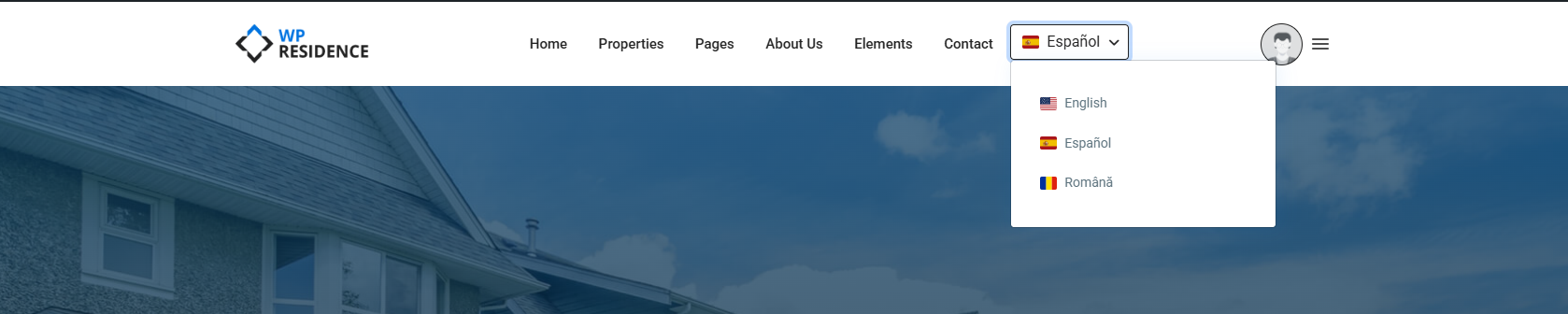
Visitors change the language with the language switcher. It opens the same page in the chosen language. Set up the switcher in the menu, in an Elementor header or as a widget: see The Language Switcher Widget.
In wp-admin, the language of the lists is chosen separately, with Content language in the top admin bar.
Redirects
WordPress sometimes redirects a page to its “correct” address. On a multilingual site that can strip or add a language prefix and send the visitor in a loop. The plugin blocks two cases, with no setting to turn on:
- Prefix redirects. A WordPress redirect that would only add or remove the language prefix is cancelled, so /br/contact/ stays /br/contact/.
- Home page without a translation. If /br/ is opened and the home page has no Portuguese version yet, the visitor stays on /br/ and sees the default home page there. Once you translate the home page, /br/ shows the translation.
After you add a language or change a language slug, open Settings > Permalinks and click Save Changes so WordPress learns the new prefixes.
Canonical and hreflang Tags
Each page tells search engines which language versions exist:
- A canonical tag with the address of the current language version.
- One hreflang tag per published translation, plus x-default.
A page that has no translation in the current language shows the original content, and its canonical tag points to the original address. No hreflang tag is added for the missing language, so search engines do not index the same text twice.
With Yoast SEO or Rank Math active, the plugin passes these addresses to them and the SEO plugin prints the tags.
When a Page Shows the Wrong Language
- The page has no prefix. Pages without a prefix always show the default language. Check the link in your menu or button: it should include the prefix, for example /br/contact/.
- A 404 or a loop after adding a language. Save the permalinks as described above.
- The text is right, the menu is not. The menu needs its own translation: see Menu Translation and Language-Specific Menu Locations.
- No hreflang tag for a language. The tag appears only when a translation exists and is published.
More: URL Structure and Permalinks and the full guide Multi Languages with WPEstate Translate.