
What is the Standalone Mortgage Calculator
The Standalone Mortgage Calculator is an Elementor widget that lets you add a mortgage calculator to any page, not only to single property pages.
This makes it useful as a general website tool for visitors who want to explore financing estimates before contacting your team or reviewing your service details.
You can use it on pages such as:
- homepage sections
- buyer guide pages
- mortgage information pages
- landing pages for financing services
- contact or lead generation pages
It can help visitors estimate monthly payments based on values like:
- price
- down payment
- interest rate
- loan term
- PMI
- property tax
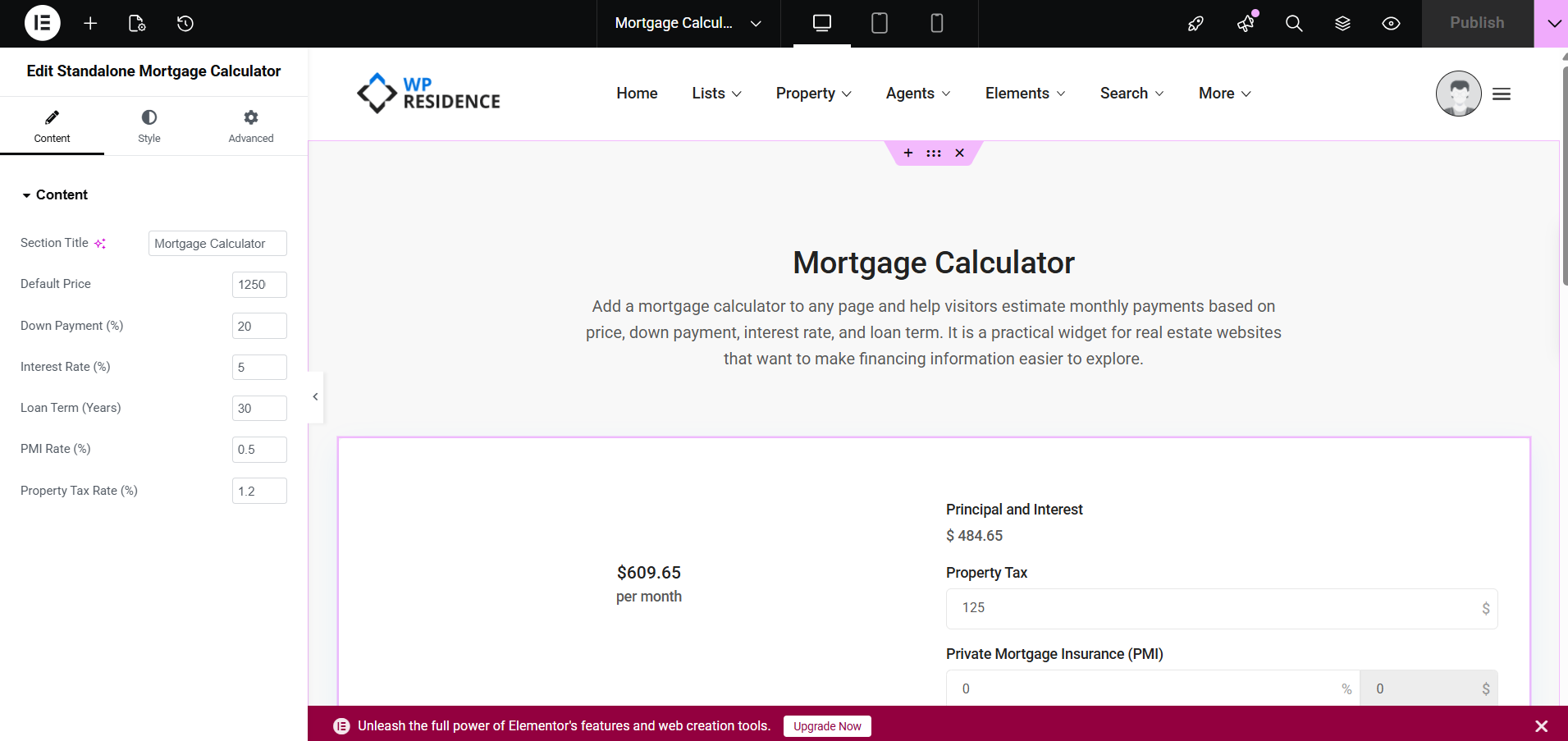
How to add the Mortgage Calculator to any page
To use this widget, edit the page with Elementor.
- Go to the page where you want to add the calculator.
- Click Edit with Elementor.
- Search for the Standalone Mortgage Calculator widget.
- Drag and drop the widget into the page section where you want it to appear.
- Adjust the content values from the widget settings.
- Publish or update the page.
In the screenshot example, the Elementor widget title is Edit Standalone Mortgage Calculator.
Content settings
The widget includes the following content options:
- Section Title
- Default Price
- Down Payment (%)
- Interest Rate (%)
- Loan Term (Years)
- PMI Rate (%)
- Property Tax Rate (%)
Section Title
This field controls the title shown above the calculator.
Example: Mortgage Calculator
You can rename it to match the page context, for example:
- Loan Estimator
- Monthly Payment Calculator
- Mortgage Payment Tool
Default Price
This field sets the starting price value used in the calculator.
It helps visitors start from a predefined estimate instead of entering all values from zero.
Down Payment (%)
This field sets the default down payment percentage used in the calculator.
Example: 20 means 20% down payment.
Interest Rate (%)
This field sets the default interest rate percentage used in the estimate.
Example: 5 means 5% interest rate.
Loan Term (Years)
This field defines the loan duration used in the calculation.
Example: 30 means a 30-year mortgage term.
PMI Rate (%)
This field controls the default PMI percentage used in the calculator.
This is useful when you want to include private mortgage insurance in the estimate.
Property Tax Rate (%)
This field controls the default property tax percentage used in the estimate.
This helps create a more realistic monthly payment example.
How the calculator works
The calculator uses the default values you set in Elementor as a starting point.
Visitors can then review the estimate and better understand the monthly cost breakdown.
In the screenshot example, the widget shows values such as:
- monthly payment estimate
- principal and interest
- property tax
- private mortgage insurance (PMI)
This makes it a practical tool for helping users explore financing-related details directly on your site.
Why use the Mortgage Calculator on any page
In earlier setups, the mortgage calculator was commonly associated with single property pages.
With the Standalone Mortgage Calculator widget, you can now use the calculator as a broader website tool.
This is useful if you want to:
- educate visitors about financing
- keep users engaged longer on the site
- support buyer decision-making before direct contact
- add a helpful tool to service pages without needing a specific property page
It can also support pages focused on your site services, as long as the information shown follows your own business and legal policies.
Important note
If you want, you can place this widget together with service text, a contact form, or a call-to-action button so visitors can first explore estimated payments and then contact your team for more details.