
What is Forced Registration
Forced Registration is a new option added in WPResidence 5.6.0 that helps you limit how much anonymous visitors can browse before they must register on the website.
You can use this feature to require registration after visitors view a specific number of properties or gallery images. This is useful for lead generation websites that want to allow a limited preview first, then ask users to create an account to continue browsing.
Where to find Forced Registration settings
You can manage this feature from:
Theme Options > General Settings > Forced Registration
In this panel, you can enable the feature, define how many free views are allowed, set when the counters reset, and customize the message shown to visitors when registration becomes required.
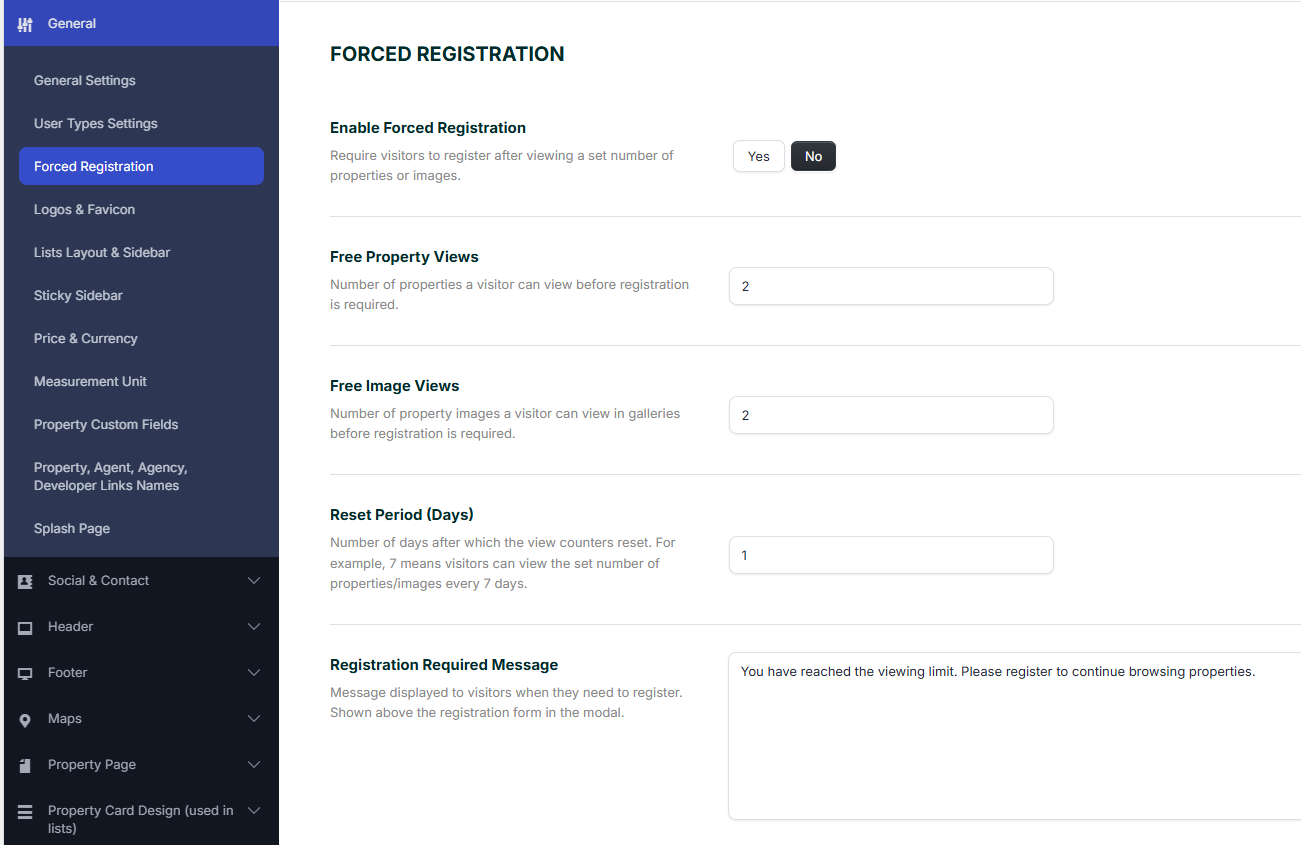
Enable Forced Registration
To activate this option, set Enable Forced Registration to Yes.
When enabled, visitors can browse only the number of properties and images allowed by your settings. After they reach that limit, the theme will require registration before they can continue.
Free Property Views
Free Property Views controls how many property pages a visitor can open before registration is required.
For example, if you set this value to 2, a visitor can view 2 property pages without registering. When they try to continue browsing after reaching that limit, they will be prompted to register.
Free Image Views
Free Image Views controls how many property gallery images a visitor can open before registration is required.
This setting is useful if you want to let users preview a limited number of images, but require an account for deeper browsing.
For example, if this value is set to 2, a visitor can open only 2 gallery images before the registration prompt is shown.
Reset Period
Reset Period (Days) defines after how many days the property and image view counters reset for the visitor.
If you set this to 1, the visitor can use the allowed number of free views again after 1 day.
If you set this to 7, the counters reset every 7 days.
Registration Required Message
The Registration Required Message is the custom text shown to visitors when they reach the browsing limit and need to register.
This message is displayed above the registration form in the modal window, so you can use it to clearly explain why registration is required and encourage users to sign up.
Example message:
You have reached the viewing limit. Please register to continue browsing properties.
How Forced Registration works on the front end
Once Forced Registration is enabled, the theme tracks how many property pages and gallery images a non-logged-in visitor views.
As long as the visitor stays under the limits you defined, they can continue browsing normally.
After one of the limits is reached, the visitor is asked to register before they can continue viewing more content.
This means you can allow partial browsing access while still using the website as a lead capture tool.
Example setup
Here is a simple example based on the settings shown:
- Enable Forced Registration: Yes
- Free Property Views: 2
- Free Image Views: 2
- Reset Period: 1 day
- Message: You have reached the viewing limit. Please register to continue browsing properties.
With this setup, a visitor can view 2 property pages and 2 gallery images before being required to register. After 1 day, the counters reset and the free views are available again.