
The WPResidence real estate CRM supports SMS alerts through Twilio. When a new lead arrives, the assigned agent’s phone gets a text within seconds — even if they are nowhere near a computer.
This article walks through configuring Twilio, customizing the SMS template, and sending a test message.
What You Need
- A Twilio account (free trial works for testing).
- An Account SID.
- An Auth Token.
- A Twilio phone number with SMS enabled.
Configuring Twilio
Go to CRM Settings → Notify SMS.
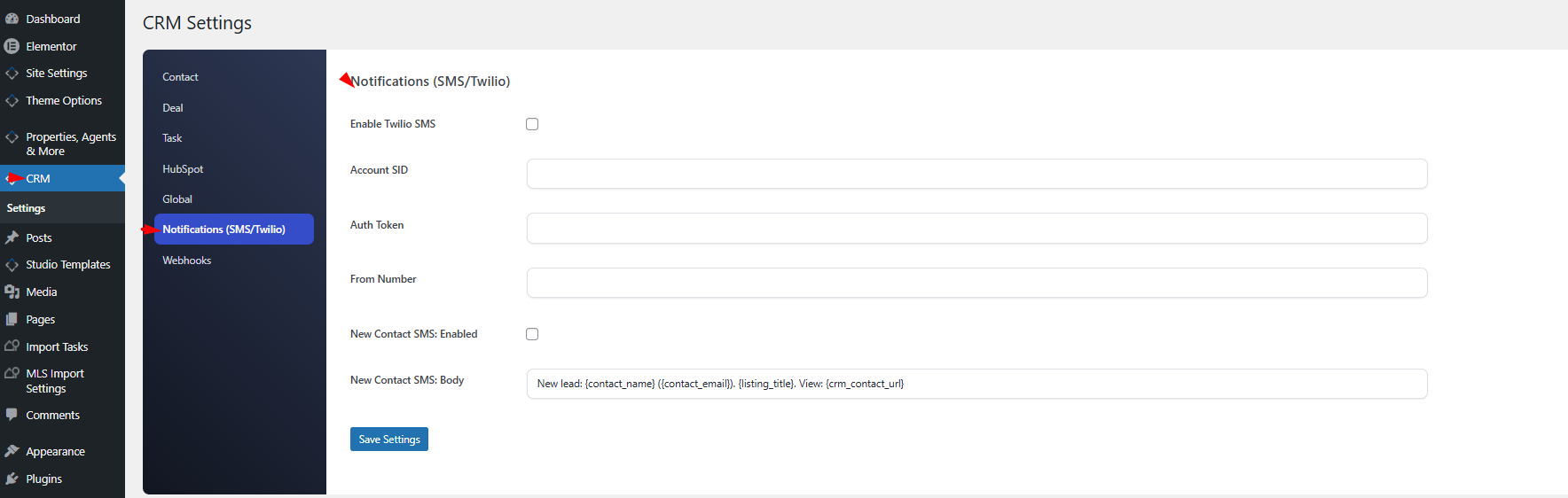
Enable the master switch and paste your credentials:
| Setting | Description |
|---|---|
| Enable SMS | Master on/off switch. |
| Account SID | From your Twilio console. |
| Auth Token | From your Twilio console. |
| From Number | Your Twilio phone number in E.164 format (e.g., +14155551234). |
The New-Contact SMS
When enabled, an SMS is sent to the assigned agent each time a new contact is created. You can enable or disable this event and customize the body.
Default Template
New lead: {contact_name} ({contact_email}). {listing_title}. View: {crm_contact_url}Placeholders
All 20 placeholders available in email notifications also work in SMS templates. Keep the body short — SMS messages are limited to 160 characters for a single segment.
Agent Phone Number Resolution
The CRM finds the agent’s phone in this order:
crm_phoneuser meta (set from the CRM profile).billing_phoneuser meta (WooCommerce’s phone field, if present).
If neither exists, no SMS is sent for that event.
Testing the Integration
On the Notify SMS settings tab, use the Send Test SMS button. Enter the destination phone number in E.164 format and click send. You will receive:
Test SMS from {site_name} CRM. If you received this, Twilio is configured correctly.If the test fails, the error message indicates whether it is a credential problem, a number-format problem, or a Twilio API error.
Costs
Each SMS is billed by Twilio per message segment. Rates vary by destination country — international SMS is much more expensive than domestic. Review your Twilio pricing page before enabling SMS for high-volume lead flows.
When NOT to Use SMS
- High-volume lead sources where the cost would exceed value.
- Jurisdictions with strict commercial-SMS consent rules where recipients have not opted in.
- Non-urgent events — use email for those.
Logging
Every successful SMS is recorded as an sms_sent activity on the contact’s timeline, so you can see exactly when alerts went out and to which agent.
Best Practices
- Keep the template under 160 characters.
- Always include a link back to the CRM contact page so the agent can click and act.
- Start with SMS enabled only for high-value events — new leads from Premium property pages, for example.