
From version 5.8.0, WPResidence adds schema.org structured data (JSON-LD) to property, agent and agency pages. Search engines and AI tools read it to understand the price, address, rooms and agent of a listing. It is automatic: there is nothing to turn on.
Which pages get structured data
| Page | Schema type | What it contains |
|---|---|---|
| Property page | RealEstateListing | Title, link, description, featured image, publish date, price and currency, and the assigned agent or agency. |
| Property page | Accommodation (linked to the listing) | Address, city, county/state, zip, country, map coordinates, bedrooms, bathrooms and size. |
| Agent page | RealEstateAgent | Name, page link, photo, email and phone. |
| Agency page | RealEstateAgent | Name, page link, logo, email, phone and office address. |
Developer pages, the home page, blog posts and other pages do not get this data.
Empty fields are left out. A property with no price has no offer in the data, and a property with no agent or agency has no agent in the data.
Settings that change the data
The data comes from the property, agent and agency fields you already fill in. Two Theme Options decide how the price and size are described:
- Currency: Theme Options > General > Price & Currency > Currency Label. Use the 3-letter ISO 4217 code, for example USD, EUR or GBP. The price in the structured data uses this code.
- Size unit: Theme Options > General > Measurement Unit > Measurement Unit for Property Size. The size is sent with the matching standard unit code.
| Measurement unit | Unit code in the data |
|---|---|
| square feet (ft) | FTK |
| square meters (m) | MTK |
| acres (ac) | ACR |
| square yards (yd) | YDK |
| hectares (ha) | HAR |
How to check it on your site
- Open the Schema Markup Validator at validator.schema.org.
- On a live site, use the Fetch URL tab and paste the link of a property, agent or agency page.
- On a local or password-protected site, use the Code snippet tab. Open the property page, press Ctrl+U (Cmd+Option+U on Mac) to see the page source, search for ld+json, and copy that whole script tag into the validator.
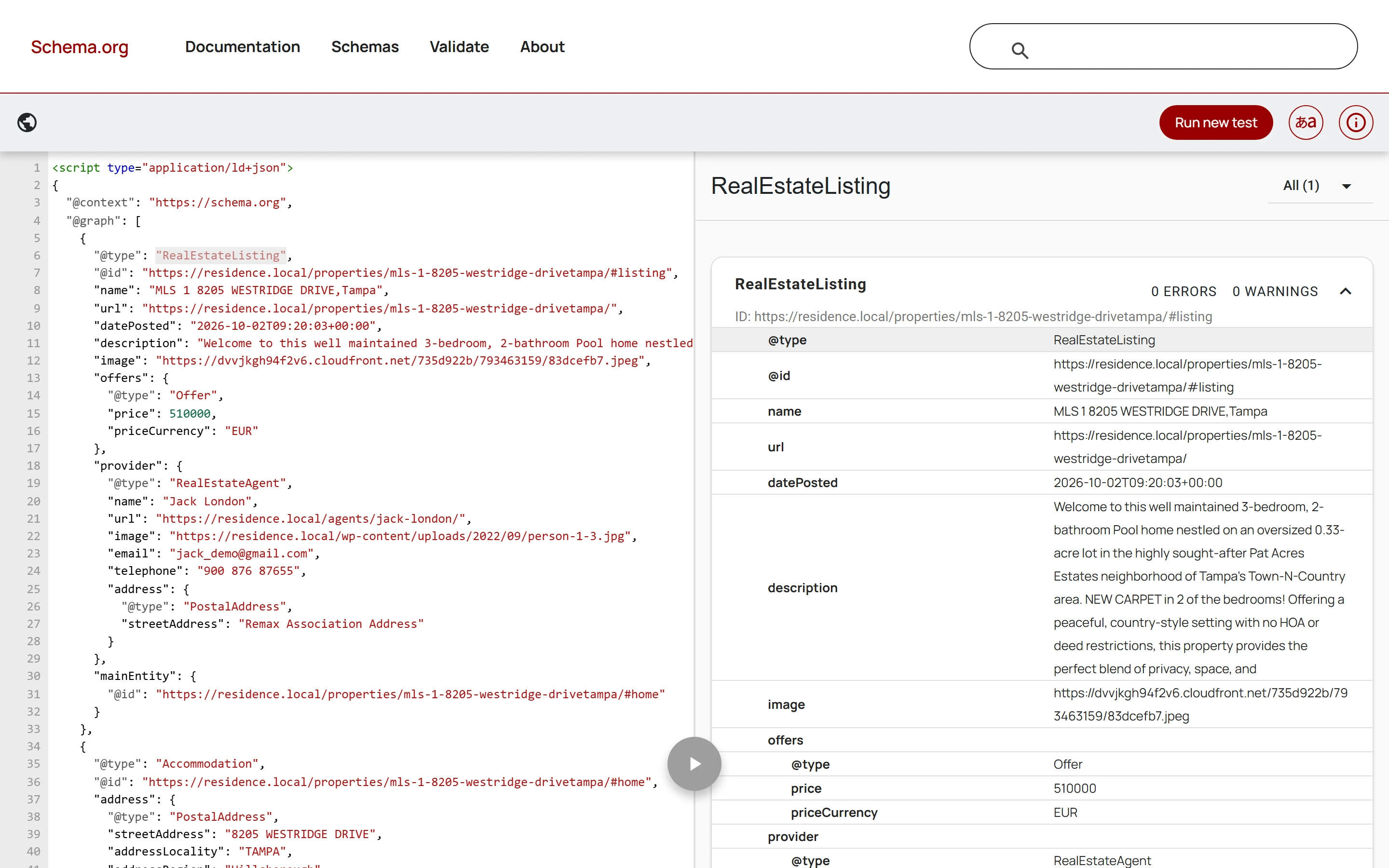
- Run the test. The right side lists RealEstateListing (or RealEstateAgent) with the values from your page and the number of errors and warnings.
The screenshot below is a property from a WPResidence test site: RealEstateListing is found with 0 errors and 0 warnings, and the price, currency and agent come from the property.
What changes in Google
Google has no special search result design for real estate listings, so your results will look the same in Google, and Google’s Rich Results Test will not list these pages. The data still tells search engines and AI assistants the exact price, address and agent of each listing. For SEO plugins that work with the theme, see Recommended plugins for SEO.