
WP Residence Help WP Residence Help

  • WpEstate
  • WPRESIDENCE
  • Video Tutorials
  • Client Support
  • API
Home / 13. WPResidence / WPEstate CRM / Twilio SMS Notifications in the WPResidence CRM

Twilio SMS Notifications in the WPResidence CRM

16 views 0

The WPResidence real estate CRM supports SMS alerts through Twilio. When a new lead arrives, the assigned agent’s phone gets a text within seconds — even if they are nowhere near a computer.

This article walks through configuring Twilio, customizing the SMS template, and sending a test message.

What You Need

  • A Twilio account (free trial works for testing).
  • An Account SID.
  • An Auth Token.
  • A Twilio phone number with SMS enabled.

Configuring Twilio

Go to CRM Settings → Notify SMS.
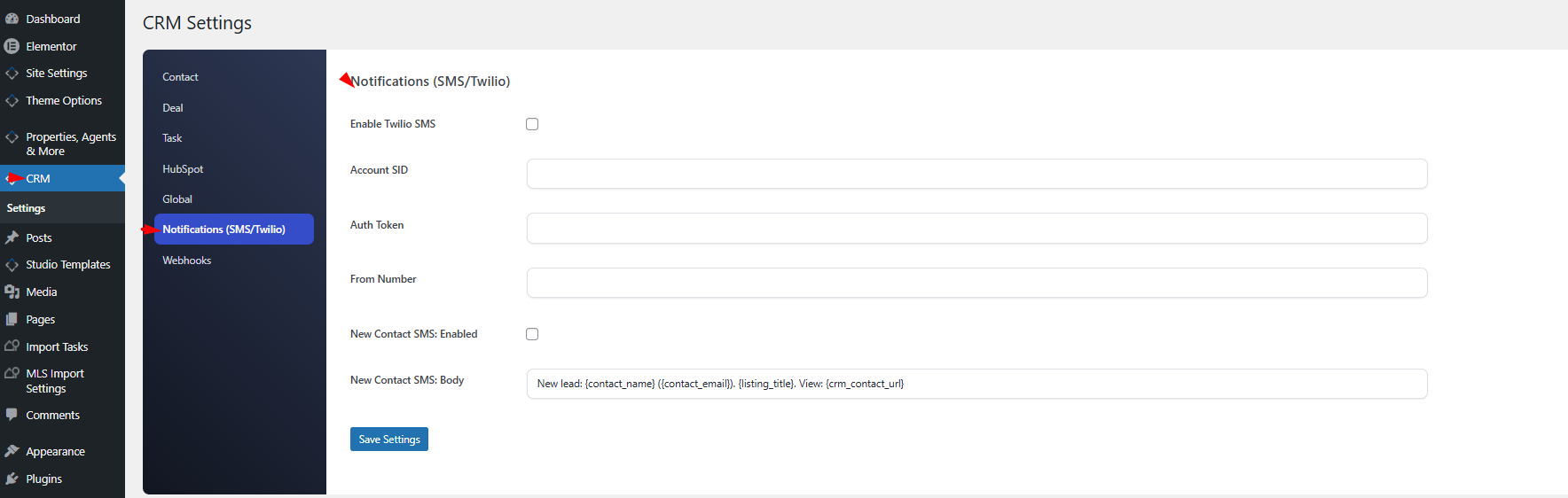
Enable the master switch and paste your credentials:

Setting Description
Enable SMS Master on/off switch.
Account SID From your Twilio console.
Auth Token From your Twilio console.
From Number Your Twilio phone number in E.164 format (e.g., +14155551234).

The New-Contact SMS

When enabled, an SMS is sent to the assigned agent each time a new contact is created. You can enable or disable this event and customize the body.

Default Template

New lead: {contact_name} ({contact_email}). {listing_title}. View: {crm_contact_url}

Placeholders

All 20 placeholders available in email notifications also work in SMS templates. Keep the body short — SMS messages are limited to 160 characters for a single segment.

Agent Phone Number Resolution

The CRM finds the agent’s phone in this order:

  1. crm_phone user meta (set from the CRM profile).
  2. billing_phone user meta (WooCommerce’s phone field, if present).

If neither exists, no SMS is sent for that event.

Testing the Integration

On the Notify SMS settings tab, use the Send Test SMS button. Enter the destination phone number in E.164 format and click send. You will receive:

Test SMS from {site_name} CRM. If you received this, Twilio is configured correctly.

If the test fails, the error message indicates whether it is a credential problem, a number-format problem, or a Twilio API error.

Costs

Each SMS is billed by Twilio per message segment. Rates vary by destination country — international SMS is much more expensive than domestic. Review your Twilio pricing page before enabling SMS for high-volume lead flows.

When NOT to Use SMS

  • High-volume lead sources where the cost would exceed value.
  • Jurisdictions with strict commercial-SMS consent rules where recipients have not opted in.
  • Non-urgent events — use email for those.

Logging

Every successful SMS is recorded as an sms_sent activity on the contact’s timeline, so you can see exactly when alerts went out and to which agent.

Best Practices

  • Keep the template under 160 characters.
  • Always include a link back to the CRM contact page so the agent can click and act.
  • Start with SMS enabled only for high-value events — new leads from Premium property pages, for example.
13. WPResidence / WPEstate CRM

Related Articles

  • WPResidence CRM Security Model — Developer Reference
  • CRM Security and Data Privacy
  • WPResidence CRM Installation and Updates — Developer Reference
  • Installing and Updating the WPResidence CRM

WP Residence Documentation

  • 01. Getting Started
    • How to Get Support
    • Get your buyer license code.
    • Use SSL / https
    • Server / Theme Requirements
  • 02. Installation & Setup
  • 03. Installation FAQ
  • 06. Search & Filtering
    • Advanced Search Display Settings
    • Advanced Search Form
    • Geolocation Search for Half Map
    • Save Search Theme Options
    • Advanced Search Colors
  • 09. Agent, Agency & Developers
  • 08. Property Pages & Layouts
  • 07. Property Lists, Categories & Archive
  • 14. WPResidence Elementor Studio
  • 10. Blog Posts & Blog List
  • 11. Shortcodes
    • Contact Form
    • Featured Agency/Developer
    • Membership Packages
    • Testimonials
    • Google Map with Property Marker
    • Listings per Agent, Agency or Developer
    • Display Categories
    • Agent List
    • Recent Items Slider
    • Recent items
    • List Properties or Articles by ID
    • Featured Agent
    • Featured Article
    • Featured Property
    • Login & Register Form
    • Icon Content Box Shortcode
  • 12. Widgets
  • 04. Theme Options & Global Settings
    • General Settings
    • User Types Settings
    • Appearance
    • Logos & Favicon
    • Header
    • Footer Style and Colors
    • Price & Currency
    • Property Custom Fields
    • Features & Amenities
    • Listing Labels
    • Theme Slider
    • Permalinks
    • Splash Page
    • Social & Contact
    • Map Settings
    • Pin Management
    • How read from file works
    • General Design Settings
    • Custom Colors Settings
    • Header Design & Colors
    • Mobile Menu Colors
    • User Dashboard Colors
    • Print PDF Design
    • Property, Agent, Blog Lists Design Settings
    • Sidebar Widget Design
    • Font management
    • How to add custom CSS
    • Custom Property Card Unit – Beta version
    • Email Management
    • Import & Export theme options
    • reCaptcha settings
    • YELP API Integration
    • iHomefinder Optima Express IDX
    • MEMBERSHIP & PAYMENT Settings
    • Property Submission Page
    • PayPal Setup
    • Stripe Setup
    • Wire Transfer Payment Method
  • 20. Translations & Languages
  • 26. FAQ
  • 10. Pages
  • 11. Header
  • 12. Footer
  • 05. Maps & Location Settings
  • 18. Payments & Monetization
  • Plugins
    • 19. Included Plugins
    • 22. Third Party Plugins – IDX Compatibility
    • 21. Third-Party Plugins – Multi-Language
    • 23. Third party Plugins – Other
  • Technical
    • 24. Technical how to | Custom Code Required
    • 25. Technical: Child Theme

Join Us On

Powered by WP Estate - All Rights Reserved
  • WpEstate
  • WPRESIDENCE
  • Video Tutorials
  • Client Support
  • API