
WP Residence Help WP Residence Help

  • WPRESIDENCE
  • Video Tutorials
  • Client Support
  • API
Home / Technical how to | Custom Code / Technical how to : Change image size requirements for upload images in front end submission

Technical how to : Change image size requirements for upload images in front end submission

3600 views 0

Starting with WPResidence v.13 we introduced an image size check for images. We did that since many times users upload small images that get stretched or simply don’t look good. The scripts check if the image is at least 500px x 500px.

If you want to change the size we check (or simply disable it) you need to go into

wpresidence/libs/ajax_upload.php 
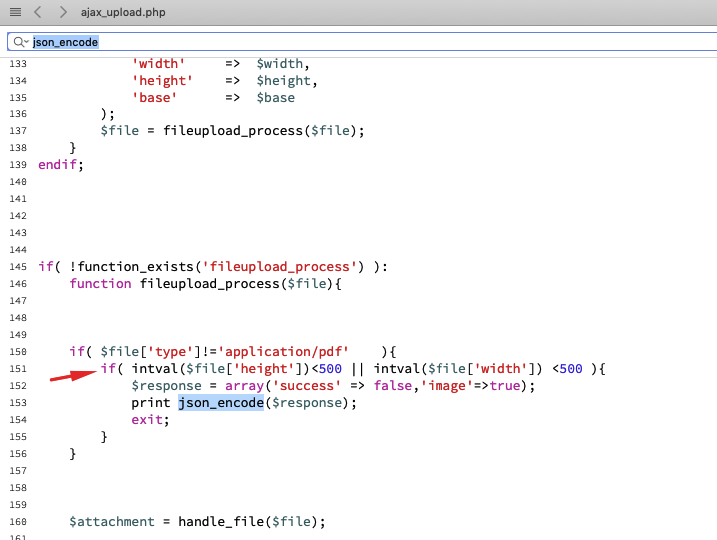
where you have

if( intval ( $file['base']) ==0){
if( intval($file['height']) false,'image'=>true);
echo json_encode($response);
exit;
}
}

Change the 500 value with the size you  want. If you want to disable the check just delete that code.

There is a text warning that can be changed from languages files – https://help.wpresidence.net/article/how-to-rename-theme-words-with-loco-translate/ or in code in file path \wpresidence\libs\css_js_include.php

'warning' => esc_html__('Image needs to be at least 500px height x 500px wide!','wpresidence')


Technical how to | Custom Code

Related Articles

  • Technical: Change the Schedule Tour Email Text and the Form Default Message
  • Property list filter customization
  • Technical – How to Change the Minimum Image Dimensions for Property Uploads in WPResidence
  • Introduction to WPResidence Header Customization
MLSImportWordPress IDX Plugin for MLS ListingsImport MLS listings into your WordPress website, customize your property pages, and keep your inventory updated.Start free 30-day trial →

Help Categories

  • 51 Getting Started
  • 72 Installation & Setup
  • 243 Installation FAQ
  • 18Agent, Agency & Developers
  • 5Blog Posts & Blog Lists
  • 39Elementor Shortcodes Built-In
  • 56FAQ
  • 15Footer
  • 37Header
  • 2IDX & MLSImport
  • 23Maps & Location Settings
  • 21Multi-Language - Third Party Plugins
  • 7Other Third party Plugins
  • 21Pages
  • 4Payments & Monetization
  • 20Property Lists, Categories & Archive
  • 37Property Pages & Layouts
  • 32Search & Filtering
  • 162Technical how to | Custom Code
  • 8Technical: Actions and filters
  • 7Technical: Child Theme
  • 86Theme Options & Global Settings
  • 6Translations & Languages
  • 16WPBakery Shortcodes
  • 50WPEstate Translate Plugin
  • 51WPResidence / WPEstate CRM
  • 50WPResidence 5.0 Documentation
  • 9WPResidence Elementor Studio

Join Us On

Powered by WP Estate - All Rights Reserved
  • WPRESIDENCE
  • Video Tutorials
  • Client Support
  • API