
The AI Assistant lets you run your site by chatting in Claude or ChatGPT: check what waits for you, approve listings, edit properties, agents, pages and Theme Options. It is included only in WPResidence Pro, the version sold on wpresidence.net, starting with version 7.0.1. The ThemeForest version does not have it.
What you need
| License | A WPResidence Pro license bought on wpresidence.net, registered with Purchased on wpresidence.net. How to register your license |
| WordPress | Version 6.9 or newer. |
| Site address | A public site with HTTPS. Claude and ChatGPT cannot connect to a local site or to plain HTTP. |
| User | An administrator account on the site. |
| AI app | A Claude or ChatGPT account that lets you add a custom connector. |
Turn on the AI Assistant
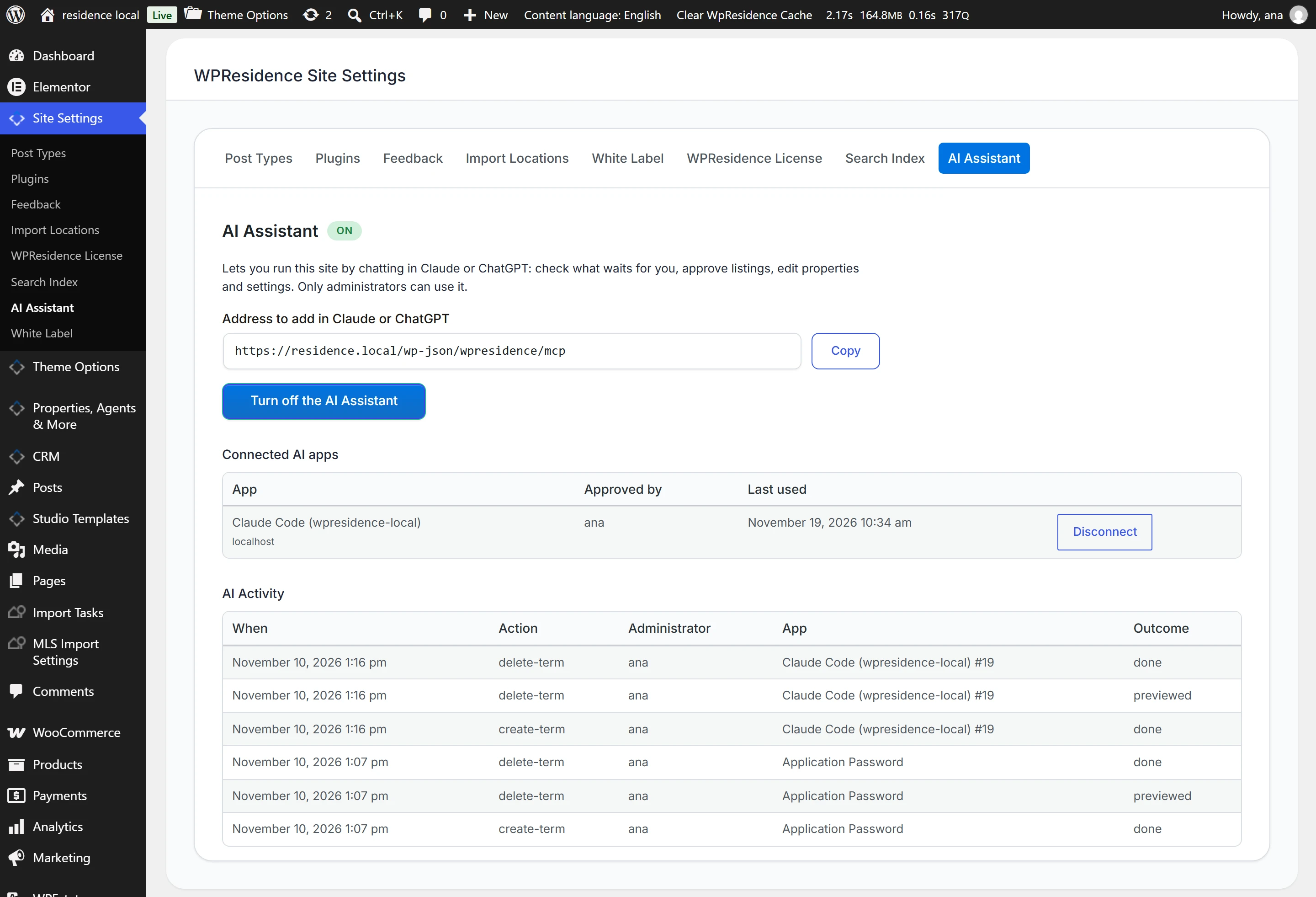
- Go to Site Settings → AI Assistant in the WordPress admin menu.
- Click Turn on the AI Assistant. It is off by default.
- Click Copy next to Address to add in Claude or ChatGPT. The address has the form https://yoursite.com/wp-json/wpresidence/mcp.
Connect Claude or ChatGPT
- Add the address as a custom connector in Claude, or as a connector in ChatGPT.
- Sign in to your site as an administrator when the AI app sends you there. The page Connect an AI app to this site shows which app asks for access.
- Click Allow. Allow only if you started the connection yourself from Claude or ChatGPT.
The app now appears under Connected AI apps on the AI Assistant tab, with the administrator who approved it and when it was last used.
What you can ask
The AI Assistant has over 200 tools. Ask in plain words, for example:
- What is waiting for me on the site today?
- Approve the pending listings from agent John and make the two villas featured.
- Change the price of the property on Ocean Drive to 450,000.
- Add a new agent and assign her the listings of the agent who left.
- Change the main color and the header design.
- List the CRM leads from this week.
It covers listings, agents, agencies and developers, the CRM, pages and Elementor elements, menus, Theme Options, users, memberships and invoices, saved searches, reviews and translations.
Who can use it and what is recorded
- Administrators only. Only an administrator can approve an AI app, and the app acts as that administrator. If that user is deleted or is no longer an administrator, the app stops working.
- Deletions need two steps. When the AI deletes or overwrites something, the first request only shows what would change. The change happens only on a second request, within 10 minutes.
- AI Activity. The latest changes the AI made are listed on the AI Assistant tab: when, which action, which administrator, which app and how it ended.
- Disconnect. Click Disconnect next to an app to remove it. An app not used for 90 days expires. Turn off the AI Assistant disconnects all apps.
Messages on the AI Assistant tab
| Message | What to do |
|---|---|
| To use the AI Assistant, you need a subscription license bought on wpresidence.net. | Register a WPResidence Pro license on the WPResidence License tab. |
| The AI Assistant needs WordPress 6.9 or newer. | Update WordPress. |
| Another plugin on this site loads a different version of the WordPress MCP Adapter. | The AI Assistant stays off; the rest of the site works. Deactivate the other MCP plugin, or open a support ticket. |
| This site does not use HTTPS. | Move the site to HTTPS. Claude and ChatGPT connect only over HTTPS. |