
WP Residence Help WP Residence Help

  • WPRESIDENCE
  • Video Tutorials
  • Client Support
  • API
Home / Technical how to | Custom Code Required / Technical – Change step in price slider

Technical – Change step in price slider

3586 views 1

How to Change the Price Slider Step

Theme version 5.3.2.1 and newer

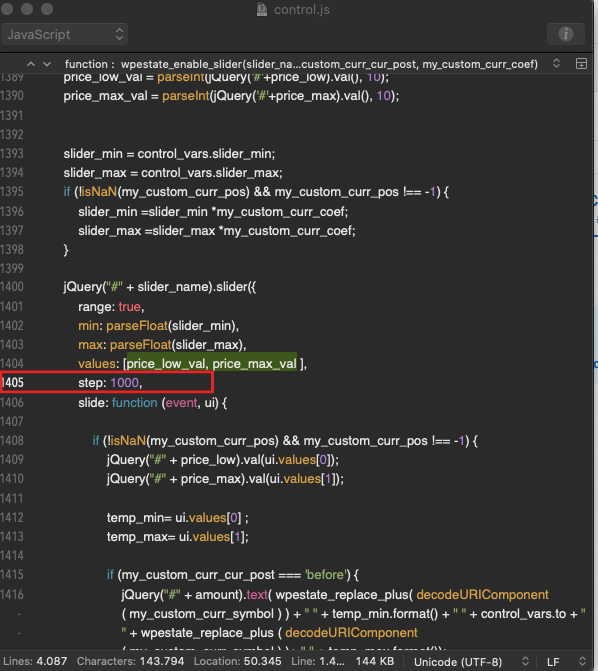
  1. Open the parent theme JavaScript file wpresidence/js/control.js.
  2. Locate the function wpestate_enable_slider (around line 4616 in WPResidence version 5.3.2.1).
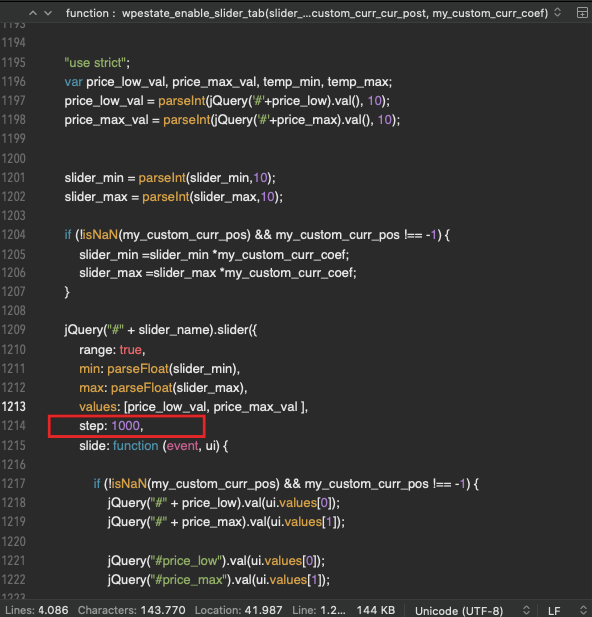
  3. Inside the jQuery slider configuration block, add a step property immediately after the values definition so it looks like:
jQuery("#" + slider_name).slider({ range: true, min: parseFloat(slider_min), max: parseFloat(slider_max), values: [price_low_val, price_max_val ], step: 1000, ... }); 

Set the numeric value of step to match the price increment you need. The wpestate_enable_slider helper powers the search shortcodes, sidebar widgets, Elementor blocks, and mobile filters, so one update covers all price sliders.

Older theme releases

If you are using a legacy build, the same wpestate_enable_slider function still resides in wp-content/themes/wpresidence/js/control.js. Edit the slider configuration in that location and add the step property exactly as shown above.

Cache considerations

This adjustment modifies a JavaScript file. Clear any plugin, server, or CDN caching layers (including services such as Cloudflare) to ensure browsers download the updated control.js before testing.
Technical how to | Custom Code Required

Related Articles

  • Technical: Change the Schedule Tour Email Text and the Form Default Message
  • Property list filter customization
  • Technical – How to Change the Minimum Image Dimensions for Property Uploads in WPResidence
  • Introduction to WPResidence Header Customization

Help Categories

  • 18Agent, Agency & Developers
  • 5Blog Posts & Blog Lists
  • 39Elementor Shortcodes Built-In
  • 53FAQ
  • 15Footer
  • 5Getting Started
  • 37Header
  • 2IDX & MLSImport
  • 6Installation & Setup
  • 24Installation FAQ
  • 23Maps & Location Settings
  • 21Multi-Language - Third Party Plugins
  • 6Other Third party Plugins
  • 21Pages
  • 4Payments & Monetization
  • 20Property Lists, Categories & Archive
  • 37Property Pages & Layouts
  • 32Search & Filtering
  • 162Technical how to | Custom Code Required
  • 8Technical: Actions and filters
  • 7Technical: Child Theme
  • 86Theme Options & Global Settings
  • 7Translations & Languages
  • 16WPBakery Shortcodes
  • 50WPEstate / WPResidence Translate Plugin
  • 51WPResidence / WPEstate CRM
  • 50WPResidence 5.0 Documentation
  • 9WPResidence Elementor Studio

Join Us On

Powered by WP Estate - All Rights Reserved
  • WPRESIDENCE
  • Video Tutorials
  • Client Support
  • API