
WP Residence Help WP Residence Help

  • WPRESIDENCE
  • Video Tutorials
  • Client Support
  • API
Home / Technical how to | Custom Code / How to change design of Featured status and Full info button in default unit

How to change design of Featured status and Full info button in default unit

3253 views 0

To change design of Featured  status change CSS in this class:
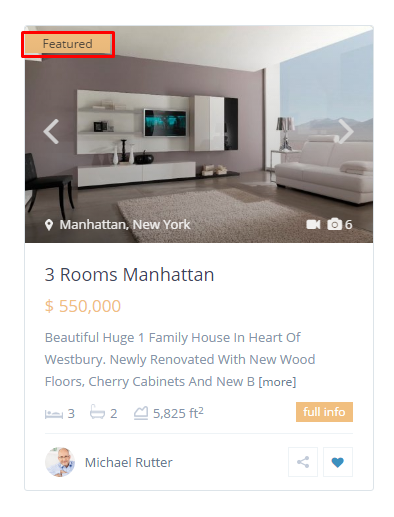
Default property unit

.featured_div {
max-width: 85px;
float: left;
background-color: #f1bf7f;
color: #333333;
position: relative;
left: 0px;
font-size: 12px;
border-radius: 0px;
padding: 1px 18px;
line-height: 17px;
background-image: none!important;
margin-bottom: 4px;
}

To change design of Full info button change CSS in these classes:

.unit_details_x a, .unit_details_x {
font-size: 12px;
background-color: #f1bf7f;
color: #ffffff;
float: right;
padding: 4px 7px;
margin-top: 4px;
line-height: 12px;
}

.unit_details_x:hover {
color: #3c90be;
}

Help for where to add custom css: https://help.wpresidence.net/article/how-to-add-custom-css/

Technical how to | Custom Code

Related Articles

  • Technical: Change the Schedule Tour Email Text and the Form Default Message
  • Property list filter customization
  • Technical – How to Change the Minimum Image Dimensions for Property Uploads in WPResidence
  • Introduction to WPResidence Header Customization
MLSImportWordPress IDX Plugin for MLS ListingsImport MLS listings into your WordPress website, customize your property pages, and keep your inventory updated.Start free 30-day trial →

Help Categories

  • 51 Getting Started
  • 72 Installation & Setup
  • 243 Installation FAQ
  • 18Agent, Agency & Developers
  • 5Blog Posts & Blog Lists
  • 39Elementor Shortcodes Built-In
  • 56FAQ
  • 15Footer
  • 37Header
  • 2IDX & MLSImport
  • 23Maps & Location Settings
  • 21Multi-Language - Third Party Plugins
  • 7Other Third party Plugins
  • 21Pages
  • 4Payments & Monetization
  • 20Property Lists, Categories & Archive
  • 37Property Pages & Layouts
  • 32Search & Filtering
  • 162Technical how to | Custom Code
  • 8Technical: Actions and filters
  • 7Technical: Child Theme
  • 86Theme Options & Global Settings
  • 6Translations & Languages
  • 16WPBakery Shortcodes
  • 50WPEstate Translate Plugin
  • 51WPResidence / WPEstate CRM
  • 50WPResidence 5.0 Documentation
  • 9WPResidence Elementor Studio

Join Us On

Powered by WP Estate - All Rights Reserved
  • WPRESIDENCE
  • Video Tutorials
  • Client Support
  • API