WP Residence Help WP Residence Help

  • WPRESIDENCE
  • Video Tutorials
  • Client Support
  • API
Home / Third Party Plugins Compatible / WPML – Translate Features & Amenities

WPML – Translate Features & Amenities

4838 views 0

For new strings (like custom fields, features and amenities) to register – you must have the option to register new strings on.  We recommend to keep it only when you’re logged in as admin as this is a setting that will slow down your site if used on limited servers.

wpml string

Also, since 3.0 version new strings register in the list when you access a page with those string on the page from front end.

This means you must check all features and amenities to a property – and then you access the property in front end. The strings then register in STRING TRANSLATION.

Same applies for custom fields. You must fill in all custom fields for a property post. Save. Then access the property page in front end. Then check String Translation to find the new custom fields.

Summary or all the steps you must follow for features and amenities to translate in property page and in advance search:

1. Go to WPML Translation Management – Multilingual Content Setup

wpml1

2. Look for the features and amenities you have in your list and make sure that you have the option set to translation –

wpml2

3. In string translation make sure you have the option to check for new strings  (you can enable this when you have new features/fields and disable it when your translation is done so this option doesn’t increase site speed)

wpml3

4. Check String Translation. There must be 2 instances for each feature –  and translate both.

wpml4

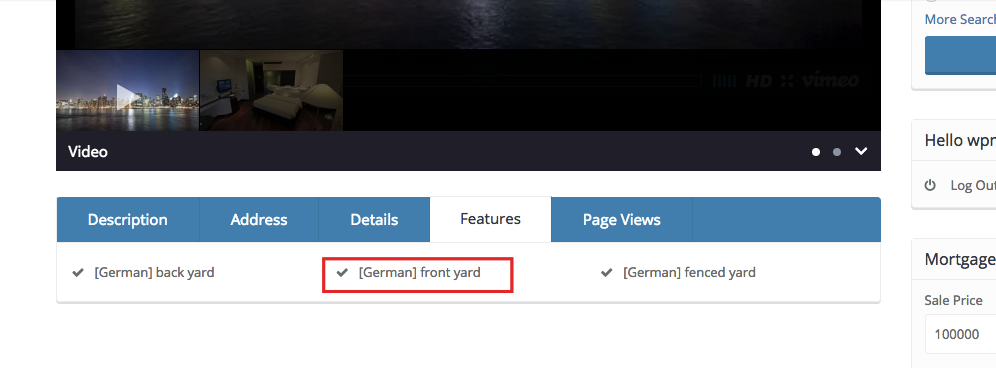
5. Translation should show in advanced search and in property page

wpml5

qpml5

wpml5

Third Party Plugins Compatible

Related Articles

  • Jetpack breaks WPResidence: missing theme JavaScript and image upload HTTP errors
  • How to translate WP Residence Studio templates with WPML
  • WpResidence and WPML (optional plugin)
  • WPML Language Switched display in top bar
MLSImportWordPress IDX Plugin for MLS ListingsImport MLS listings into your WordPress website, customize your property pages, and keep your inventory updated.Start free 30-day trial →

Help Categories

  • 111 Installation & Changelog
  • 19Agent, Agency & Developers
  • 5Blog Posts & Blog Lists
  • 14Footer
  • 38Header
  • 3IDX & MLSImport
  • 23Maps & Location Settings
  • 50Multilingual Websites – WPEstate Translate (Included)
  • 21Pages & Page Templates
  • 4Payments & Monetization
  • 20Property Lists, Categories & Archive
  • 38Property Single Page
  • 33Search & Filtering
  • 170Technical how to | Custom Code
  • 9Technical: Actions and filters
  • 6Technical: Child Theme
  • 86Theme Options & Global Settings
  • 6Theme Translation & Localization
  • 28Third Party Plugins Compatible
  • 16WPBakery Shortcodes
  • 51WPResidence / WPEstate CRM
  • 9WPResidence Elementor Studio
  • 39WPResidence Elementor Widgets
  • 79WPResidence FAQ
  • 1WPResidence PRO

Join Us On

Powered by WP Estate - All Rights Reserved
  • WPRESIDENCE
  • Video Tutorials
  • Client Support
  • API