
WP Residence Help WP Residence Help

  • WpEstate
  • WPRESIDENCE
  • Video Tutorials
  • Client Support
  • API
Home / 13. WPResidence / WPEstate CRM / Webhooks in the WPResidence CRM

Webhooks in the WPResidence CRM

14 views 0

Webhooks are how the WPResidence real estate CRM talks to the rest of the world. Every time a contact is created, a deal is won, or a form is submitted, your CRM can POST a JSON payload to a URL of your choice, powering Zapier workflows, Make scenarios, custom dashboards, or a second CRM you happen to run in parallel.

This article walks through configuring a webhook, picking events, testing, and understanding retries.

Subscribable Events

Event When it fires
contact.created A new contact is inserted.
contact.updated An existing contact is modified.
contact.deleted A contact is removed.
lead.created, lead.updated, lead.deleted Lead lifecycle.
enquiry.created A new enquiry arrives.
deal.created A new deal is opened.
deal.stage_changed A deal’s pipeline stage changes.
deal.won / deal.lost A deal closes.
task.completed A task is marked done.

Configuring a Webhook

Go to CRM Settings → Webhooks.
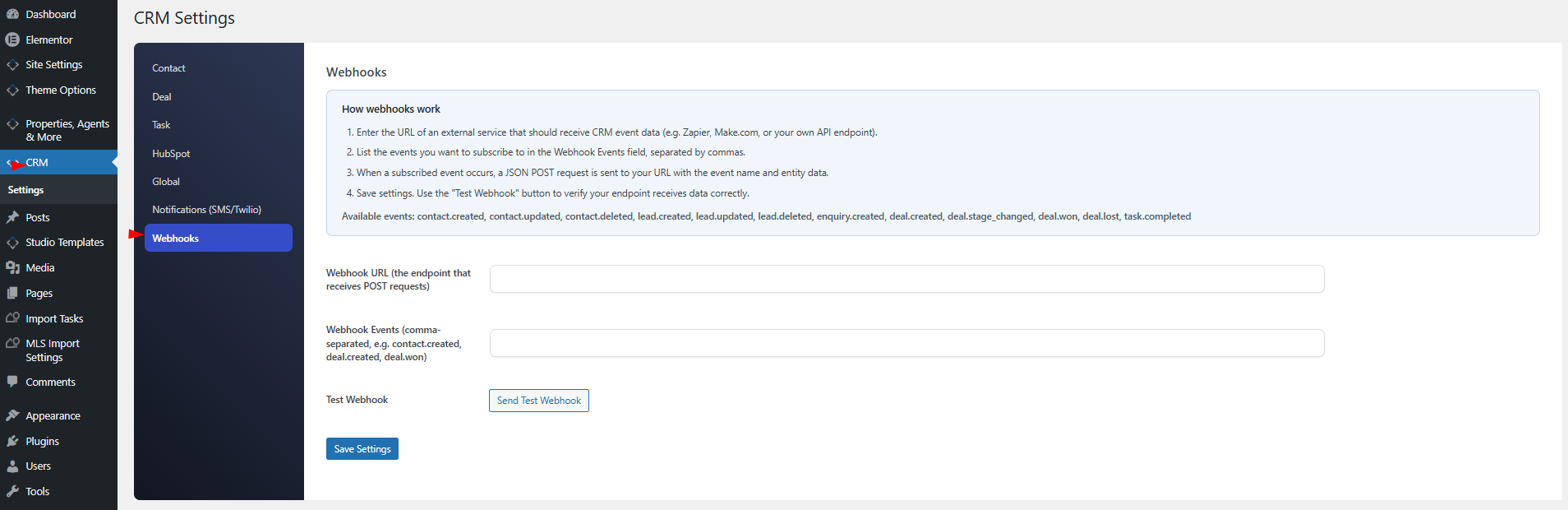
  1. Paste the destination URL.
  2. Select the events to subscribe to (comma-separated).
  3. Optionally set a signing secret for HMAC verification.
  4. Save.

Payload Format

Every dispatched webhook is a JSON POST body:

{ "event": "contact.created", "timestamp": "2026-04-17T12:34:56Z", "data": { ...entity fields... }, "site_url": "https://yoursite.com" }

Signing

If you set a signing secret, the CRM adds an X-CRM-Signature HTTP header. Its value is the HMAC-SHA256 of the JSON body with your secret as the key. On the receiving end, compute the same HMAC and compare. If they match, the webhook is authentic and untampered.

Testing

Click Test Webhook on the Webhooks settings tab. The CRM sends a sample test event to your URL with fake contact data and shows you the HTTP response code and the first 200 characters of the body. If your endpoint returns 2xx, the test passes. Anything else shows the error.

Retries

If the first attempt returns an error or a 4xx/5xx status, the CRM schedules a retry five minutes later. Up to 3 attempts total. After that, the event is dropped silently. There is no retry queue UI.

Use Cases

  • Zapier: point the webhook at a Zapier catch-hook URL and trigger any of thousands of downstream apps.
  • Make (Integromat): same pattern.
  • Slack notifications: pipe deal.won through a Zap to post to a Slack channel.
  • Custom dashboards: stream events into your own analytics pipeline.
  • Secondary CRM: mirror contacts into another system.

Security

  • Always use HTTPS URLs.
  • Always set a signing secret and verify on the receiving end.
  • Do not expose your webhook endpoint as an open internet endpoint unless you verify the signature.

HubSpot Alternative

For HubSpot specifically, you do not need webhooks. The CRM has a dedicated HubSpot integration with richer semantics. See the HubSpot CRM integration guide.

Limits

  • Only one webhook URL is supported via the simple settings UI.
  • Bulk operations fire one webhook per affected row, so plan for volume on large bulk actions.
13. WPResidence / WPEstate CRM

Related Articles

  • WPResidence CRM Security Model — Developer Reference
  • CRM Security and Data Privacy
  • WPResidence CRM Installation and Updates — Developer Reference
  • Installing and Updating the WPResidence CRM

WP Residence Documentation

  • 01. Getting Started
    • How to Get Support
    • Get your buyer license code.
    • Use SSL / https
    • Server / Theme Requirements
  • 02. Installation & Setup
  • 03. Installation FAQ
  • 06. Search & Filtering
    • Advanced Search Display Settings
    • Advanced Search Form
    • Geolocation Search for Half Map
    • Save Search Theme Options
    • Advanced Search Colors
  • 09. Agent, Agency & Developers
  • 08. Property Pages & Layouts
  • 07. Property Lists, Categories & Archive
  • 14. WPResidence Elementor Studio
  • 10. Blog Posts & Blog List
  • 11. Shortcodes
    • Contact Form
    • Featured Agency/Developer
    • Membership Packages
    • Testimonials
    • Google Map with Property Marker
    • Listings per Agent, Agency or Developer
    • Display Categories
    • Agent List
    • Recent Items Slider
    • Recent items
    • List Properties or Articles by ID
    • Featured Agent
    • Featured Article
    • Featured Property
    • Login & Register Form
    • Icon Content Box Shortcode
  • 12. Widgets
  • 04. Theme Options & Global Settings
    • General Settings
    • User Types Settings
    • Appearance
    • Logos & Favicon
    • Header
    • Footer Style and Colors
    • Price & Currency
    • Property Custom Fields
    • Features & Amenities
    • Listing Labels
    • Theme Slider
    • Permalinks
    • Splash Page
    • Social & Contact
    • Map Settings
    • Pin Management
    • How read from file works
    • General Design Settings
    • Custom Colors Settings
    • Header Design & Colors
    • Mobile Menu Colors
    • User Dashboard Colors
    • Print PDF Design
    • Property, Agent, Blog Lists Design Settings
    • Sidebar Widget Design
    • Font management
    • How to add custom CSS
    • Custom Property Card Unit – Beta version
    • Email Management
    • Import & Export theme options
    • reCaptcha settings
    • YELP API Integration
    • iHomefinder Optima Express IDX
    • MEMBERSHIP & PAYMENT Settings
    • Property Submission Page
    • PayPal Setup
    • Stripe Setup
    • Wire Transfer Payment Method
  • 20. Translations & Languages
  • 26. FAQ
  • 10. Pages
  • 11. Header
  • 12. Footer
  • 05. Maps & Location Settings
  • 18. Payments & Monetization
  • Plugins
    • 19. Included Plugins
    • 22. Third Party Plugins – IDX Compatibility
    • 21. Third-Party Plugins – Multi-Language
    • 23. Third party Plugins – Other
  • Technical
    • 24. Technical how to | Custom Code Required
    • 25. Technical: Child Theme

Join Us On

Powered by WP Estate - All Rights Reserved
  • WpEstate
  • WPRESIDENCE
  • Video Tutorials
  • Client Support
  • API