
WP Residence Help WP Residence Help

  • WpEstate
  • WPRESIDENCE
  • Video Tutorials
  • Client Support
  • API
Home / 13. WPResidence / WPEstate CRM / The CRM Settings Page

The CRM Settings Page

15 views 0

The Settings page is where administrators customize the behavior of the WPResidence real estate CRM. Picklist values (lead sources, deal stages, task types), integrations (HubSpot, Twilio, webhooks), and global defaults all live here.

Open WordPress Admin → WPEstate CRM → Settings. Access requires the manage_options capability.
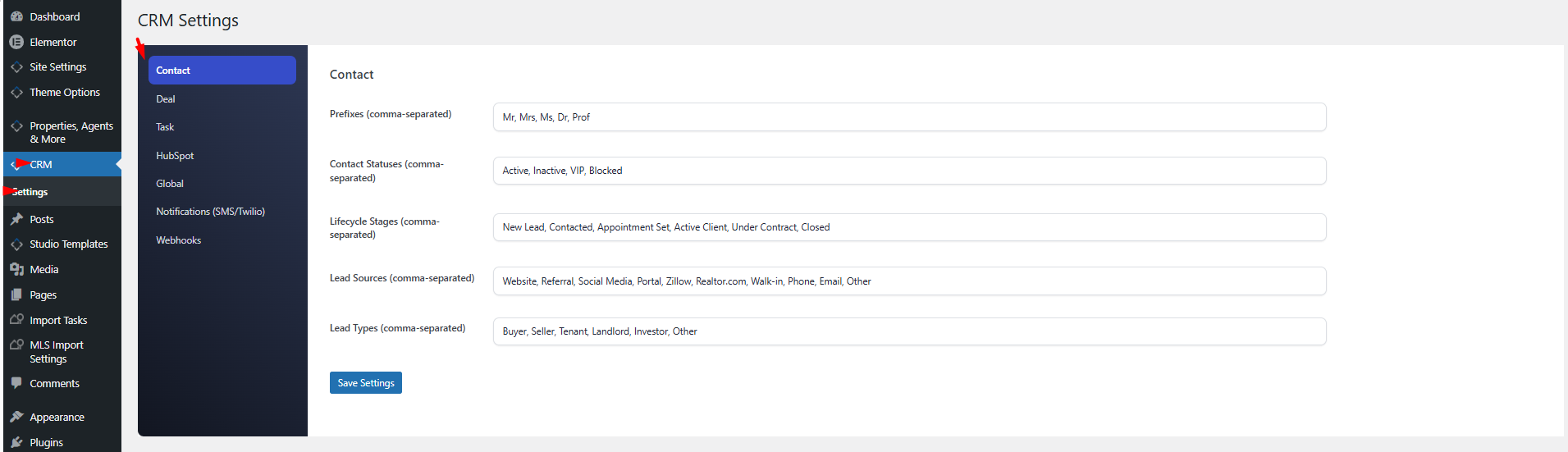
The Seven Tabs

Contact

Lists of values used across the Contacts module:

  • Prefixes — Mr, Mrs, Ms, Dr, Prof.
  • Statuses — Active, Inactive, VIP, Blocked.
  • Lifecycle stages — New Lead, Contacted, Appointment Set, Active Client, Under Contract, Closed.
  • Lead sources — Website, Referral, Social Media, Portal, Zillow, Realtor.com, Walk-in, Phone, Email, Other.
  • Lead types — Buyer, Seller, Tenant, Landlord, Investor, Other.

All are comma-separated lists. Add, remove, or rename values freely.

Deal

  • Stages — New, Viewing Scheduled, Offer Made, Negotiation, Closed Won, Closed Lost.
  • Stage colors — hex codes, index-matched to the stages list.
  • Statuses — Open, Won, Lost.
  • Next actions — Call, Email, Meeting, Send Listing, Schedule Viewing, Send Offer, Follow Up, Other.
  • Probabilities — 10, 25, 50, 75, 90, 100.

Task

  • Statuses — To Do, In Progress, Done.
  • Types — Call, Email, Meeting, Showing, Follow Up, Paperwork, Other.
  • Priorities — Low, Medium, High, Urgent.

HubSpot

  • Enable integration master switch.
  • Sync for all users — include guest form submissions, not just admin actions.
  • API token — Private App access token.
  • First stage — HubSpot stage ID for new deals.
  • Stage map — per-CRM-stage mapping to HubSpot stage IDs.
  • Test Connection button — runs 4 checks against the HubSpot API.

Global

  • Empty value text — the character or string used when a field is empty (default: —).

Notify SMS

  • Twilio credentials (Account SID, Auth Token, From Number).
  • Per-event SMS templates.
  • Send Test SMS button.

Webhooks

  • Webhook URL.
  • Comma-separated event subscription list.
  • Test Webhook button.

Saving Changes

Each tab has its own Save button. The form submits via admin-post.php, not AJAX — you will see the page reload after saving.

Resetting to Defaults

There is no reset button. Default values are re-seeded only when the plugin is activated fresh. To restore defaults, deactivate and reactivate the plugin (note: your data is preserved).

Email Notifications Are NOT on This Page

Historically, CRM email notifications had their own settings tab. They have been moved to Theme Options → Email Management → CRM Emails, which now houses all email templates for the theme and CRM in one place.

Best Practices

  • Customize picklists before onboarding your team. Renaming a lifecycle stage mid-year is annoying; changing it during setup is free.
  • Keep stage colors distinct. The deals pipeline board relies on color.
  • Test integrations (HubSpot, Twilio, webhook) from this page. The test buttons give precise errors.
  • Document your custom values. If you rename “Closed Won” to “Deal Closed”, your automations still reference the renamed value — make sure everything matches.
13. WPResidence / WPEstate CRM

Related Articles

  • WPResidence CRM Security Model — Developer Reference
  • CRM Security and Data Privacy
  • WPResidence CRM Installation and Updates — Developer Reference
  • Installing and Updating the WPResidence CRM

WP Residence Documentation

  • 01. Getting Started
    • How to Get Support
    • Get your buyer license code.
    • Use SSL / https
    • Server / Theme Requirements
  • 02. Installation & Setup
  • 03. Installation FAQ
  • 06. Search & Filtering
    • Advanced Search Display Settings
    • Advanced Search Form
    • Geolocation Search for Half Map
    • Save Search Theme Options
    • Advanced Search Colors
  • 09. Agent, Agency & Developers
  • 08. Property Pages & Layouts
  • 07. Property Lists, Categories & Archive
  • 14. WPResidence Elementor Studio
  • 10. Blog Posts & Blog List
  • 11. Shortcodes
    • Contact Form
    • Featured Agency/Developer
    • Membership Packages
    • Testimonials
    • Google Map with Property Marker
    • Listings per Agent, Agency or Developer
    • Display Categories
    • Agent List
    • Recent Items Slider
    • Recent items
    • List Properties or Articles by ID
    • Featured Agent
    • Featured Article
    • Featured Property
    • Login & Register Form
    • Icon Content Box Shortcode
  • 12. Widgets
  • 04. Theme Options & Global Settings
    • General Settings
    • User Types Settings
    • Appearance
    • Logos & Favicon
    • Header
    • Footer Style and Colors
    • Price & Currency
    • Property Custom Fields
    • Features & Amenities
    • Listing Labels
    • Theme Slider
    • Permalinks
    • Splash Page
    • Social & Contact
    • Map Settings
    • Pin Management
    • How read from file works
    • General Design Settings
    • Custom Colors Settings
    • Header Design & Colors
    • Mobile Menu Colors
    • User Dashboard Colors
    • Print PDF Design
    • Property, Agent, Blog Lists Design Settings
    • Sidebar Widget Design
    • Font management
    • How to add custom CSS
    • Custom Property Card Unit – Beta version
    • Email Management
    • Import & Export theme options
    • reCaptcha settings
    • YELP API Integration
    • iHomefinder Optima Express IDX
    • MEMBERSHIP & PAYMENT Settings
    • Property Submission Page
    • PayPal Setup
    • Stripe Setup
    • Wire Transfer Payment Method
  • 20. Translations & Languages
  • 26. FAQ
  • 10. Pages
  • 11. Header
  • 12. Footer
  • 05. Maps & Location Settings
  • 18. Payments & Monetization
  • Plugins
    • 19. Included Plugins
    • 22. Third Party Plugins – IDX Compatibility
    • 21. Third-Party Plugins – Multi-Language
    • 23. Third party Plugins – Other
  • Technical
    • 24. Technical how to | Custom Code Required
    • 25. Technical: Child Theme

Join Us On

Powered by WP Estate - All Rights Reserved
  • WpEstate
  • WPRESIDENCE
  • Video Tutorials
  • Client Support
  • API