WP Residence Help WP Residence Help

  • WPRESIDENCE
  • Video Tutorials
  • Client Support
  • API
Home / WPBakery Shortcodes / How to add the background for a row – Bakery

How to add the background for a row – Bakery

3180 views 0

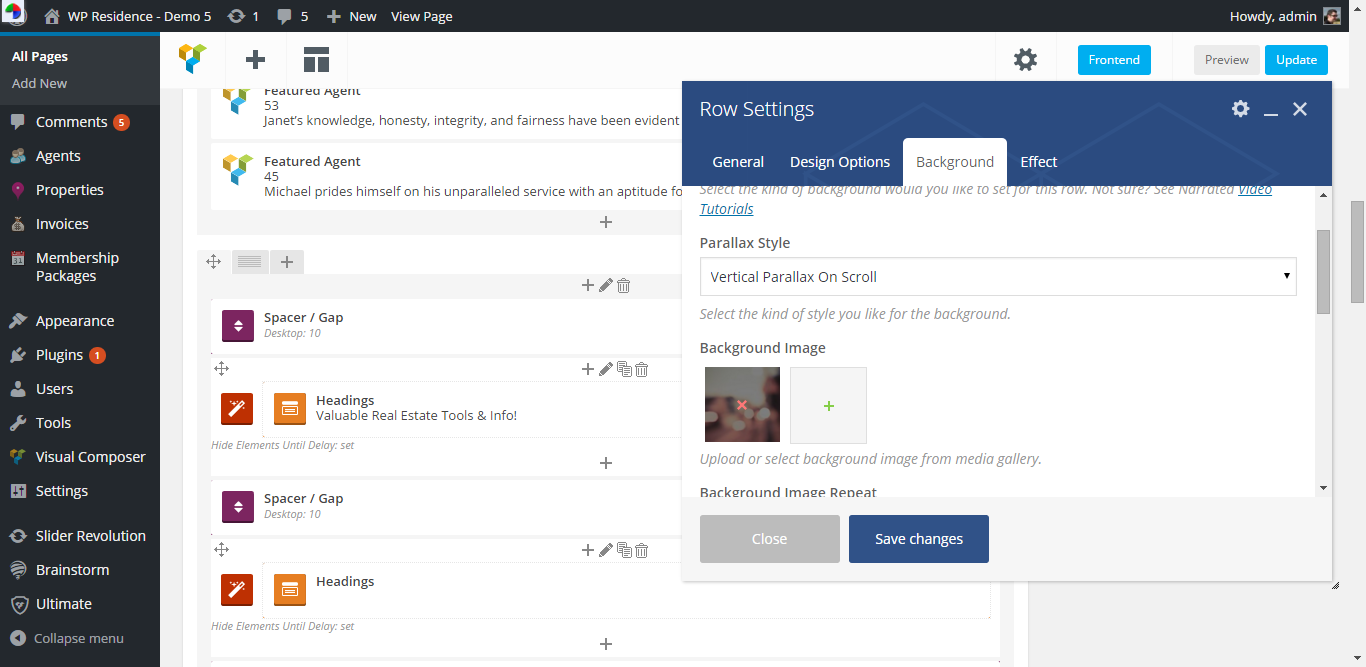
Ultimate Addons Background images do not import through demo import process. To add the background for demo “Valuable Real Estate” shortcode:

Edit the row from pencil icon –http://i.imgur.com/zsqia6e.png

back

Add this image http://demo5.wpresidence.net/wp-content/uploads/2014/05/at-background.jpg as background image –http://i.imgur.com/vHG61Q4.png

back 2

WPBakery Shortcodes

Related Articles

  • Advanced Search Shortcode
  • Energy Class for Custom property Template with Bakery Page Builder
  • Featured Agency/Developer Shortcode
  • Membership Packages Shortcode

Help Categories

  • 18Agent, Agency & Developers
  • 5Blog Posts & Blog Lists
  • 39Elementor Shortcodes Built-In
  • 53FAQ
  • 15Footer
  • 5Getting Started
  • 37Header
  • 2IDX & MLSImport
  • 6Installation & Setup
  • 24Installation FAQ
  • 23Maps & Location Settings
  • 21Multi-Language - Third Party Plugins
  • 6Other Third party Plugins
  • 21Pages
  • 4Payments & Monetization
  • 20Property Lists, Categories & Archive
  • 37Property Pages & Layouts
  • 32Search & Filtering
  • 162Technical how to | Custom Code Required
  • 8Technical: Actions and filters
  • 7Technical: Child Theme
  • 86Theme Options & Global Settings
  • 7Translations & Languages
  • 16WPBakery Shortcodes
  • 50WPEstate / WPResidence Translate Plugin
  • 51WPResidence / WPEstate CRM
  • 50WPResidence 5.0 Documentation
  • 9WPResidence Elementor Studio

Join Us On

Powered by WP Estate - All Rights Reserved
  • WPRESIDENCE
  • Video Tutorials
  • Client Support
  • API