
Bulk actions let you operate on many records at once. Delete 200 stale contacts, reassign a portfolio of deals to a new agent, mark 50 tasks complete — all from the same list view you already use. This article covers every bulk action available in the WPResidence real estate CRM.
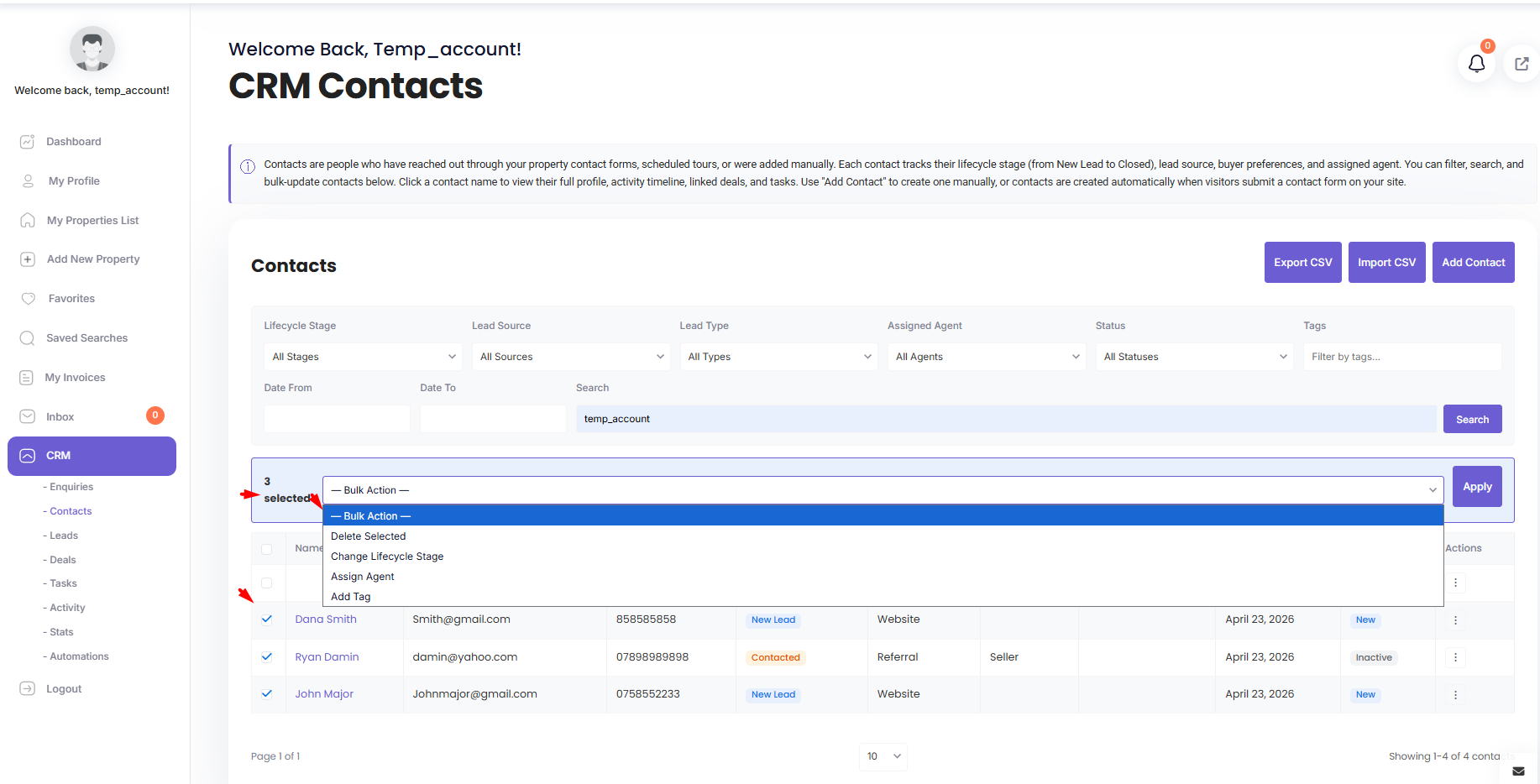
How It Works
- Open a list page (Contacts, Leads, Enquiries, Deals, Tasks, Activity).
- Check the boxes next to the rows you want to act on. Use the header checkbox to select all rows on the page.
- Open the bulk action dropdown above or below the list.
- Pick an action and click Apply.
- Confirm. The system reports how many rows were affected.
Contacts
Four bulk actions available:
| Action | Effect |
|---|---|
| Delete | Permanently remove the selected contacts. Their deals, tasks, notes, and activities remain. |
| Change lifecycle stage | Move all selected contacts to a new lifecycle stage (e.g., mass-promote from New Lead to Contacted). |
| Assign agent | Reassign all selected contacts to a single agent. |
| Add tag | Append a tag to every selected contact. Duplicate tags are automatically prevented. |
Deals
| Action | Effect |
|---|---|
| Delete | Remove selected deals. |
| Change stage | Move all selected deals to a new pipeline stage. |
Tasks
| Action | Effect |
|---|---|
| Delete | Remove selected tasks. |
| Mark complete | Set status to Completed and stamp the current timestamp on completed_at. |
Leads and Enquiries
Both support bulk delete and bulk status update.
Activities
Only bulk delete is supported. Activities are append-only records — editing them would break the audit trail.
When to Use Bulk Actions
- CSV import cleanup. After a big import, tag the new contacts with the source name and assign them to the responsible agent.
- Agent departures. Reassign a leaving agent’s entire portfolio in one click.
- Campaign tagging. Select contacts matching a filter (e.g., lifecycle stage = New Lead), apply a campaign tag.
- End-of-quarter cleanup. Close or delete truly stale deals and leads.
Permission Notes
- Admins can bulk-act on anything they can see (i.e., everything).
- Agents can only bulk-act on records they own or are assigned to. If you select a row you don’t own, it will be silently skipped and the affected count will be lower than expected.
Safety
- Bulk delete is permanent. There is no trash or undo. Export to CSV first if you are not 100% sure.
- Automations can fire on bulk updates. Changing 200 contacts’ lifecycle stage could trigger 200 emails. Pause relevant automations before large operations.
- Webhooks can fire in bulk. External systems linked by webhook will receive one event per row.
Best Practices
- Filter first, then bulk. Get the list down to exactly what you want before selecting.
- Test on one row first, then do the rest in bulk.
- Export the selection to CSV before bulk-deleting, just in case.