
This article explains how to fix an issue where property images upload successfully but do not display in the WPResidence property admin (gallery/media area). In some cases, you may also see a browser console error similar to: Cannot read properties of undefined (reading ‘url’).
What you will see
- Images upload successfully to the Media Library.
- Images are attached to the property but do not appear visually in the property gallery/admin panel.
- Selecting multiple images may fail or the media modal may stop responding.
- In some cases, the browser console shows an error like Cannot read properties of undefined (reading ‘url’).
When it happens
- This can happen on any WPResidence version.
- This can happen with or without Elementor.
- It often affects only one website even if other sites use the same theme/plugin versions.
- It is commonly seen after image optimization or performance changes.
Why it happens
WPResidence relies on WordPress-generated thumbnails to display preview images inside the property admin area.
If WordPress is configured to generate no thumbnails, WPResidence may not be able to retrieve valid preview URLs. The result is:
- Images exist and upload correctly,
- but the property admin cannot display them visually.
The most common cause is:
- WordPress Media image sizes set to 0 in Dashboard → Settings → Media (often done to reduce thumbnail generation).
This also explains why it may happen on only one site: that specific site can have different Media settings or older attachment metadata, even if versions look identical.
Solution: Restore WordPress Media image sizes (recommended)
This fixes the root cause and is the recommended solution.
Step 1: Restore Media settings
- Go to WordPress Dashboard → Settings → Media.
- Make sure the image sizes are not set to 0.
- Use reasonable non-zero values.
- Click Save Changes.
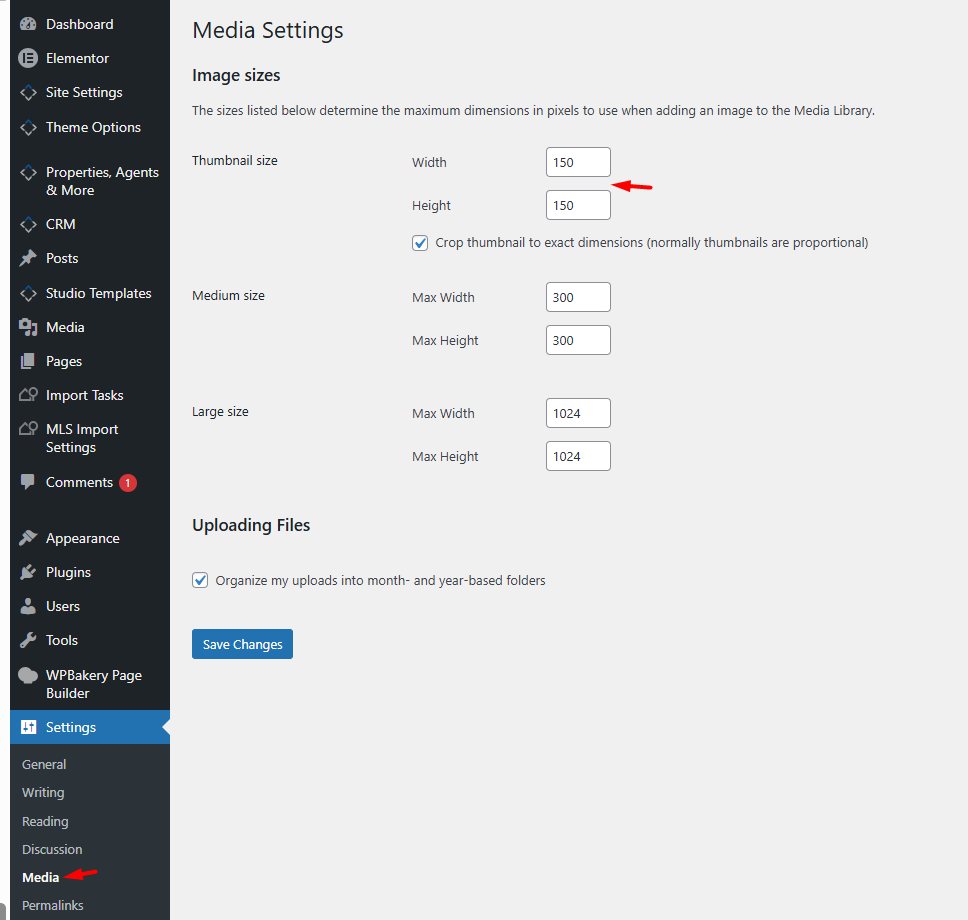
Step 2: Regenerate thumbnails
Existing images may still have missing thumbnail metadata. Regenerating thumbnails usually resolves this.
- Install a thumbnail regeneration plugin (example: Regenerate Thumbnails).
- Run the regeneration process.
- Remove the plugin afterward if you prefer.
Step 3: Clear caches
- Hard refresh your browser (especially in wp-admin).
- Clear any caching or optimization plugin cache.
- Clear server cache or CDN cache if used.
Step 4: Retest
- Edit a property and try selecting multiple images again.
- Confirm that property images now display correctly.
Extra checks if it only happens on one site
- Compare Settings → Media values with a working site.
- Temporarily disable optimization or media-related plugins and retest.
- Test with a brand-new image upload (not an older library item).
- Check for admin-side JS errors caused by minify/merge settings in optimization plugins.
How to prevent it
- Do not set WordPress image sizes to 0 if you want property image previews to display.
- Avoid disabling thumbnails globally.
- If you change Media settings, always regenerate thumbnails afterward.
Need help
If the issue persists after the steps above, please open a support ticket and include:
- Your WPResidence version
- Your WordPress version
- Your active page builder (Elementor / WPBakery / Gutenberg)
- A screenshot of Settings → Media
- The full browser console error (if any)
Support portal: https://support.wpestate.org/